mmap and DISKANN both let a vector database serve more data than fits in RAM, but they work at different layers. mmap is an operating-system mechanism: Milvus maps index and field files into virtual memory and lets the kernel page them in from local disk on demand, without changing the index algorithm. DISKANN is an index algorithm designed for SSDs: it keeps compact PQ codes in memory, stores the full graph and vectors on disk in a layout built for few, predictable reads, and controls its own I/O. In short, mmap changes where an existing index lives; DISKANN changes how the search itself is organized around the disk.
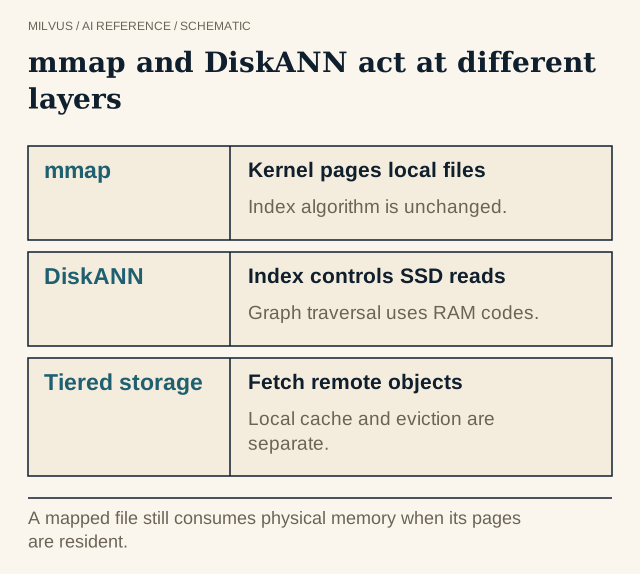 mmap and DiskANN act at different layers. A mapped file still consumes physical memory when its pages are resident.
mmap vs DISKANN at a glance
| mmap in Milvus | DISKANN | |
|---|---|---|
| What it is | A loading strategy for fields and indexes | A graph index (Vamana) plus in-memory PQ codes |
| Works with | FLAT, IVF_FLAT, IVF_SQ8, IVF_PQ, HNSW, SCANN, BIN_FLAT, BIN_IVF_FLAT, SPARSE_INVERTED_INDEX, SPARSE_WAND; INVERTED scalar indexes; raw scalar and vector fields | Its own index only |
| What stays in RAM | Whatever the OS page cache currently holds | PQ codes (default budget 12.5% of raw vector size) plus a configurable node cache |
| Who decides what to read | The kernel, page by page (typically 4 KB), on page fault | The algorithm, in batched beam reads |
| Latency when cold | Can spike sharply if access is random | Bounded by a known number of SSD reads per hop |
| Turn it on | mmap.enabled at collection, field, or index level, or queryNode.mmap.* | index_type="DISKANN" with queryNode.enableDisk: true |
| Best fit | Data mostly fits in memory, or cold fields you rarely read | Vectors far exceed RAM and you need stable latency |
How does mmap work?
mmap is a Unix system call that maps a file into a process’s address space. Nothing is read when the mapping is created. When code touches an address whose page is not resident, the CPU raises a page fault, the kernel reads that page from disk into the page cache, and execution continues. Under memory pressure the kernel evicts least-recently-used clean pages, which can be re-read later.
Two consequences matter for vector search. First, a large mapped region costs almost no RAM until it is used, so a collection can load quickly and occupy more disk than memory. Second, the hot working set still lives in physical memory, just in the page cache rather than in Milvus’s heap. If the working set fits, performance is close to fully in-memory. If it does not, every miss turns into a synchronous disk read inside the query, and tail latency climbs.
That is why access pattern matters so much. An HNSW traversal hops between scattered nodes, so a cold graph can trigger a page fault for nearly every hop. A scan over IVF lists reads contiguous ranges, which the kernel can read ahead efficiently. Either way, the deciding question is whether the frequently touched pages stay resident.
How does DISKANN handle disk instead?
DISKANN is built so the disk is part of the design rather than a fallback. Milvus’s implementation has three pieces:
- A Vamana graph on SSD, with each node’s neighbor list and full vector stored together so one read returns both.
MaxDegree(default 56) andSearchListSize(default 100) shape the graph. - PQ codes in memory for approximate distances during traversal.
PQCodeBudgetGBRatio(default 0.125) sets their size relative to the raw vectors. - A beam search that reads several candidate nodes in parallel per step (
BeamWidthRatio, default 4, times CPU cores), plus a cache of frequently visited nodes (SearchCacheBudgetGBRatio, default 0.1).
Most distance work happens on in-memory PQ codes, and the disk is touched only to fetch neighbor lists and full vectors for precise rescoring. The search-time knob is search_list. The Milvus index guide’s rule of thumb is that if roughly a quarter of your raw data fits in memory, DISKANN gives stable latency, while if all of it fits, memory-based indexes (optionally with mmap) are the natural choice. For details, see when to use DISKANN in Milvus.
Configuring mmap in Milvus
Milvus resolves mmap settings hierarchically: field and index settings override collection settings, which override the cluster defaults in milvus.yaml.
Cluster defaults (all false by default):
queryNode:
  mmap:
    scalarField: false   # raw scalar data
    scalarIndex: false   # scalar indexes (INVERTED)
    vectorField: false   # raw vector data
    vectorIndex: false   # vector indexes (supported types only)
    mmapDirPath: /mnt/nvme/milvus/mmap   # default: {localStorage.path}/mmap
Per collection, field, or index with PyMilvus:
# Collection-wide: map raw data of all fields
client.create_collection("docs", schema=schema,
                         properties={"mmap.enabled": "true"})

# One large field, e.g. a text payload you rarely read
client.alter_collection_field("docs", field_name="body",
                              field_params={"mmap.enabled": True})

# One index
client.alter_index_properties("docs", index_name="embedding_idx",
                              properties={"mmap.enabled": True})
Changes take effect only after you release and reload the collection. Put mmapDirPath on a fast local NVMe drive; mapped files on slow or network storage turn every page fault into a long stall.
The guiding principle from the Milvus docs is simple: keep frequently accessed data and indexes fully loaded, and map the rest. A common pattern is to keep the vector index in memory while mapping large text or JSON fields that are only read when results are returned.
Where does tiered storage fit?
Tiered storage (Milvus 2.6.4+) is a third, separate mechanism. Instead of downloading every segment to the query node at load time, Milvus loads only metadata, fetches field data in chunks and indexes per segment from object storage on first access, and evicts cold data with an LRU policy governed by memory and disk watermarks. A warm-up setting preloads chosen fields or indexes so the first query does not pay the fetch cost.
So the three choices answer different questions: tiered storage decides what is on the query node at all, mmap decides whether local data sits in RAM or is paged from local disk, and the index type decides the search algorithm and its I/O pattern. The hot and cold serving guide shows how these combine.
How should you choose and test?
- Estimate the working set. Work out raw vectors, index structure, and scalar fields with the memory estimation guide. If everything fits with headroom, you may not need either.
- Map cold fields first. Large payload fields are the safest mmap win because they are touched only for returned rows.
- Map indexes cautiously. Mapping an HNSW or IVF index helps when most queries hit a stable subset of pages; it hurts when queries are spread uniformly over a corpus much larger than RAM.
- Switch to DISKANN when vectors are several times larger than memory and p99 latency must stay predictable.
- Consider quantization as an alternative: an
IVF_SQ8orIVF_RABITQindex may simply fit in memory. See vector quantization trade-offs.
Test each candidate the same way: cold start after a fresh load, a warmed steady state, and a shifted query mix. Record resident memory, major page faults, disk read throughput, p50/p99 latency, and recall at fixed search parameters. Include reload after node replacement, since cold pages make recovery slower. The benchmarking guide covers the harness side.
To experiment, start Milvus with the Quickstart, then follow the mmap guide to map one field and compare memory before and after reload.