Vector search can find past agent runs that resemble the current task, so an agent can reuse what worked (as few-shot examples or hints) and avoid what failed, and so engineers can find similar incidents when debugging. The recipe: store each trajectory, meaning the ordered steps of observations, tool calls, results, and an outcome, in a trace store; index searchable representations of it (a task embedding, a summary embedding, and optionally embeddings of individual step windows); filter by applicability (same tools, environment, tenant, outcome); retrieve diverse matches; and pass the agent a compact, verified version rather than raw logs. Similarity finds candidates; metadata decides whether they apply.
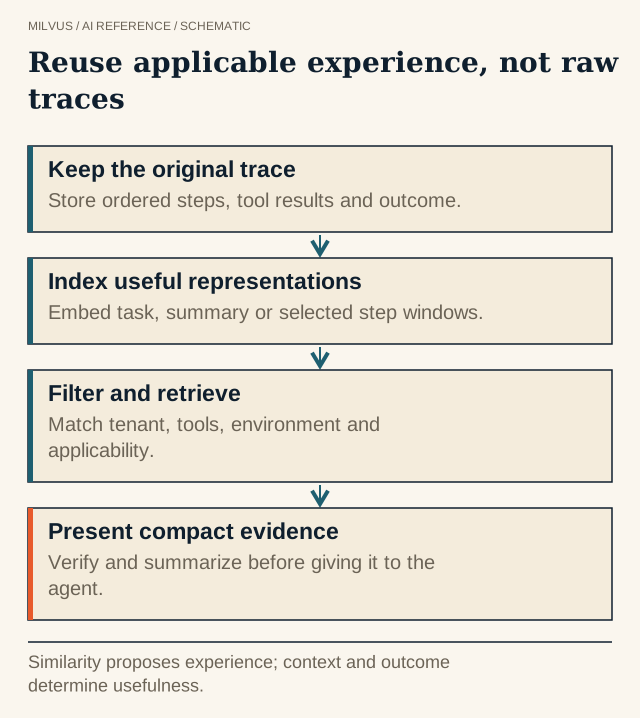 Reuse applicable experience, not raw traces. Similarity proposes experience; context and outcome determine usefulness.
What is a trajectory, and why retrieve one?
A trajectory is the record of one agent attempt at a task: the instruction, each reasoning step, each tool call with its arguments and result, observations from the environment, and the final outcome. Retrieval puts that history to work at run time:
- Few-shot exemplars. Showing the model a complete, successful run on a similar task often helps more than abstract instructions. Synapse (Zheng et al.) used retrieved full trajectories as exemplars for computer-control tasks and reported a 99.2% average success rate on MiniWoB++ and a 56% relative improvement on Mind2Web.
- Learning from experience without fine-tuning. ExpeL (Zhao et al.) lets agents collect experiences on training tasks, extract insights, and recall similar successful trajectories at inference, which works even with API-only models.
- Failure avoidance. Retrieving a similar failed attempt, with its error, warns the agent away from a known dead end.
- Debugging and analysis. Engineers search for “runs that look like this broken one” across thousands of traces.
This is different from choosing rollouts for a training dataset, which is offline curation; see how to select rollouts for offline training. It is also a specialized form of episodic memory, described in types of agent memory.
What should you embed?
Raw traces are long, noisy, and full of IDs and boilerplate, so embed derived text at the level you want to match:
| Representation | Text that is embedded | Matches | Use for |
|---|---|---|---|
| Task | The instruction or user goal | “Similar problem” | Finding exemplars for a new task |
| Episode summary | Goal + approach + outcome in a few sentences | “Similar problem solved a similar way” | Few-shot selection, analysis |
| Step window | 2-5 consecutive steps: observation, action, result | “Similar situation mid-task” | Recovering from a specific error |
| Failure summary | Error, cause, what fixed it | “Similar failure” | Debugging, avoidance hints |
Task and summary embeddings find related runs; step-window embeddings find the precise moment (“the test runner returned exit code 137”) inside a long run. Keep them linked by trajectory_id and step_index so a hit on a step can be expanded to its neighbors. Add a BM25 full-text field over step text if agents need to match exact error strings or tool names; hybrid search then covers both.
A schema for trajectory retrieval in Milvus
Keep the authoritative event sequence where it can be replayed and audited (a trace store, log system, or object storage), and index pointers to it:
| Field | Purpose |
|---|---|
id (primary key) | Row ID for an episode or step record |
trajectory_id, step_index, level (episode / step) | Linking steps to episodes |
task_id, task_family | Grouping and coverage |
tenant | Isolation; a good partition key |
policy_version, env_version, tool_versions | Applicability filters |
outcome (success, failure, infra_error), reward | Choosing positive or negative examples |
text | The summary or step text that was embedded |
embedding | Similarity search |
trace_uri | Pointer to the full trace |
Milvus also supports arrays of structs, which can hold an ordered list of steps inside one record when you want a whole trajectory as a single entity.
Filter for applicability first
A similar trajectory can still be useless or dangerous. A fix that worked on library version 2 may break on version 3; a support workflow for one product may be wrong for another; a trajectory from another customer must never be shown. Put hard constraints into the filter, built from trusted application context rather than from model-generated text:
hits = client.search(
    collection_name="trajectories",
    data=[embed(current_task)],
    anns_field="embedding",
    filter=(f'tenant == "{tenant}" and level == "episode" and outcome == "success" '
            f'and env_version == "{env_version}"'),
    group_by_field="trajectory_id", group_size=1, limit=5,
    output_fields=["trajectory_id", "text", "reward", "trace_uri"],
)
Softer signals such as recency, reward, or number of steps are better used as reranking features than as filters.
Retrieve diverse, readable examples
- One result per trajectory. Long runs produce many similar step records; grouping search with
group_by_field="trajectory_id"returns the best match from each distinct run instead of five steps from one. - Mix outcomes deliberately. For exemplars, use mostly successes. For "what not to do", add one similar failure with its error and cause, clearly labeled.
- Expand around step hits. When a step window matches, fetch neighboring steps by
trajectory_idandstep_indexwith a scalarquery, so the agent sees the observation and result, not just the action. - Rerank by applicability. A cross-encoder or a short LLM check (“does this example’s setup match the current task?”) filters near-misses before they reach the prompt.
Present trajectories to the agent compactly
Full traces can run to tens of thousands of tokens. Compress before inserting: keep the goal, the key actions and their arguments, the decisive observations, and the outcome; drop repeated reads and verbose tool output. Two or three good exemplars usually beat ten mediocre ones. Label them as past examples, not instructions.
Treat retrieved actions as evidence, not permission. If a past run deleted files or changed production data, retrieval must not authorize repeating it; the current tool policy and approvals still apply.
How do you know retrieval helps?
Compare the agent with and without trajectory retrieval on a held-out task set. Measure task success, steps and tokens per task, tool errors, and time to completion. Include traps: tasks that look like a past success but need a different approach, tasks whose matching exemplars are from an obsolete tool version, and tasks with no useful prior. Inspect which exemplars were retrieved in failures; the usual culprits are missing applicability filters or summaries that hide the step that mattered.
To build a prototype, create the collection above with the Milvus Quickstart, index a few hundred past runs, and plug the search into an agent loop such as the agentic RAG with LangGraph tutorial. For a production example of retrieval behind AI assistants, see Read AI.
Related reading
- How should you select rollouts for an offline agent-training dataset?
- What is agentic search, and where does a vector database fit?
- How should you structure agent memory in Milvus?
- How should an agent memory system handle corrections, expiry, and deletion?
- How can vector search improve codebase retrieval for coding agents?
Sources
- Zheng et al., Synapse: Trajectory-as-Exemplar Prompting with Memory for Computer Control
- Zhao et al., ExpeL: LLM Agents Are Experiential Learners
- Constrain candidate retrieval with filters
- Diversify results by a grouping field
- Refine candidate relevance with rerankers
- Represent related elements in StructArray
- Agent execution data context (Agent Lightning)