GPU_CAGRA is Milvus’s GPU graph index, built on CAGRA (CUDA ANNS GRAph-based), an approximate nearest-neighbor algorithm designed from the ground up for NVIDIA GPUs. Like HNSW, it searches a proximity graph by walking from candidate to better candidate. Unlike HNSW, both the graph build and the search are organized to run thousands of GPU threads in parallel, so it shines when you have large batches of queries or need to build indexes over big datasets quickly.
CAGRA was introduced by NVIDIA researchers at ICDE 2024 (arXiv:2308.15136) and ships in the open-source cuVS library, which Milvus uses for its GPU indexes. The paper reports graph construction 2.2 to 27 times faster than CPU HNSW and large-batch search 33 to 77 times faster, which is the kind of gap that makes GPUs worth considering for vector search.
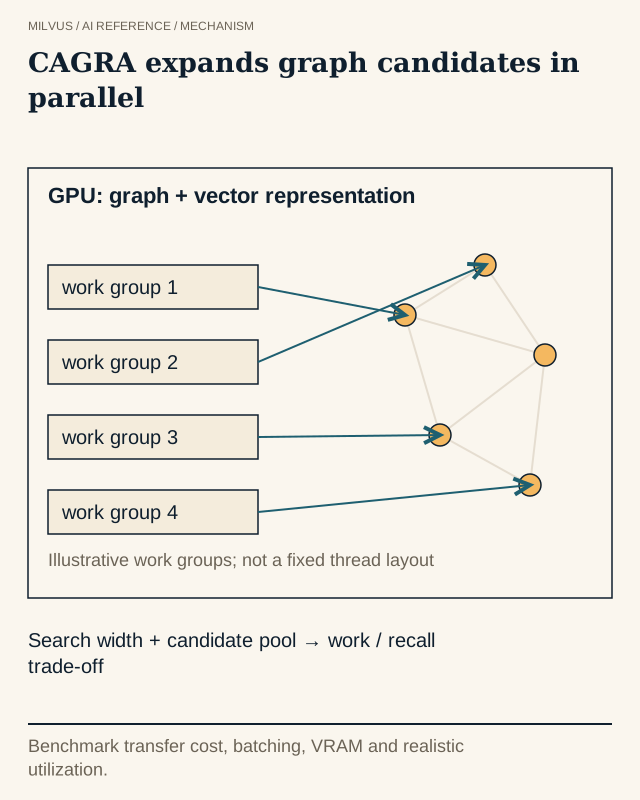 CAGRA uses parallel GPU graph search. A GPU needs enough useful work; compare at the same recall target.
How does CAGRA build its graph?
HNSW inserts vectors one at a time, and each insertion runs a graph search, which is hard to parallelize. CAGRA avoids that sequential dependency with a two-stage build:
- Build an initial k-nearest-neighbor graph. Every vector gets a list of approximate nearest neighbors, computed in bulk on the GPU. Milvus lets you pick the method with
build_algo:IVF_PQ(higher graph quality, slower) orNN_DESCENT(faster, somewhat lower recall). The size of each list isintermediate_graph_degree. - Prune it to a search graph. CAGRA removes edges that are redundant because a shorter detour already exists, and adds reverse edges so that the graph stays well connected in both directions. The final out-degree is
graph_degree, which must be smaller thanintermediate_graph_degree.
The result is a single-layer graph with a fixed number of neighbors per node. A fixed degree is important on GPUs: every node’s neighbor list has the same shape, so memory access is regular and warps of threads can process many nodes in lockstep.
How does CAGRA search?
A query starts from several entry points, chosen partly at random. CAGRA keeps an internal top-k buffer of the best candidates found so far (itopk_size). In each iteration it takes the most promising unexplored candidates from that buffer (search_width of them), fetches all their neighbors, computes distances in parallel, and merges the results back into the buffer. When the buffer stops changing, or the iteration limit is reached, the top limit results are returned.
Distance calculations for one query are spread across a small team of CUDA threads (team_size), and many queries run at once. That is why throughput rises so sharply with batch size: a single query uses only a fraction of the GPU, while a batch of thousands keeps every streaming multiprocessor busy.
GPU_CAGRA parameters in Milvus
Build parameters, from the Milvus GPU_CAGRA guide:
| Parameter | What it controls | Default |
|---|---|---|
intermediate_graph_degree | Neighbors per node before pruning; higher improves recall and slows the build (32 or 64 recommended) | 128 |
graph_degree | Neighbors per node after pruning; higher improves recall and uses more memory; must be below intermediate_graph_degree | 64 |
build_algo | IVF_PQ or NN_DESCENT for the initial kNN graph | IVF_PQ |
cache_dataset_on_device | Keep the original vectors in GPU memory so results can be refined at full precision | "false" |
adapt_for_cpu | Build on GPU, then search on CPU | "false" |
Search parameters:
| Parameter | What it controls |
|---|---|
itopk_size | Size of the intermediate candidate buffer; the main recall/throughput knob |
search_width | Number of candidates expanded (entry points) per iteration |
min_iterations, max_iterations | Bounds on search iterations; 0 means automatic |
team_size | CUDA threads per distance computation (power of 2, up to 32; 0 = automatic) |
num_random_samplings | Random sampling rounds for choosing entry points |
ef | Accuracy/latency trade-off when the index is searched on CPU via adapt_for_cpu |
index_params = client.prepare_index_params()
index_params.add_index(
    field_name="embedding",
    index_type="GPU_CAGRA",
    metric_type="L2",
    params={
        "intermediate_graph_degree": 64,
        "graph_degree": 32,
        "build_algo": "IVF_PQ",
        "cache_dataset_on_device": "true",
        "adapt_for_cpu": "false",
    },
)
client.create_index(collection_name="docs", index_params=index_params)

res = client.search(
    collection_name="docs",
    anns_field="embedding",
    data=query_batch,          # many query vectors per call
    limit=10,
    search_params={"params": {"itopk_size": 64, "search_width": 4}},
)
GPU indexes require a GPU-enabled Milvus deployment. According to the Milvus GPU index overview, GPU_CAGRA supports a top-K of up to 1,024 and needs roughly 1.8 times the raw vector size in GPU memory.
Can you build on GPU and search on CPU?
Yes. CAGRA graphs can be converted into an HNSW-style graph for CPU search, and Milvus exposes this through adapt_for_cpu. With adapt_for_cpu="true" at build time, the GPU does the expensive graph construction and search runs on CPU, where you tune it with ef. From Milvus 2.6.4, you can also make the switch at load time in milvus.yaml:
knowhere:
  GPU_CAGRA:
    load:
      adapt_for_cpu: true
This pattern is useful when builds are the bottleneck (frequent re-indexing of large collections) but query volume is too low to keep a GPU busy. Benchmark it as its own configuration: CPU search on a CAGRA-built graph has different latency and recall characteristics from GPU search.
How much GPU memory does GPU_CAGRA need?
Device memory is a hard ceiling, and extra host RAM does not help an index that does not fit. The steady-state footprint is the vectors plus the graph:
- Vectors:
N × d × 4bytes for float32. One million 1,024-dimensional vectors is about 3.9 GB. - Graph:
N × graph_degree × 4bytes. Withgraph_degree=64, one million vectors add about 244 MB.
The build needs extra headroom on top of that, especially with build_algo="IVF_PQ", and searches need buffers for queries and results. Budget generously and verify with the actual loaded size.
When does GPU_CAGRA beat a CPU index?
GPU_CAGRA pays off when the GPU is kept busy:
- Large query batches or very high QPS, such as offline candidate generation for recommendations, deduplication over millions of items, or evaluation jobs.
- Fast or frequent index builds on large collections, where CPU HNSW construction takes hours.
- High recall at high throughput, where a CPU fleet large enough to match would cost more than a GPU node.
It helps much less for a low-rate interactive service that sends one query at a time. A single query cannot fill a GPU, so latency may be no better than a well-tuned CPU HNSW index, and you still pay for the GPU. Always measure end to end, including time spent forming batches and moving queries and results between host and device. The batching and throughput guide covers how batch size trades latency for throughput.
GPU_CAGRA or GPU_IVF?
Milvus also offers GPU_IVF_FLAT, GPU_IVF_PQ, and the exact GPU_BRUTE_FORCE. The choice mirrors HNSW versus IVF on CPU. CAGRA usually gives the better recall/throughput curve and degrades smoothly as you lower itopk_size. GPU_IVF_PQ is the lever when the full vectors will not fit in device memory, because its compressed codes take far less space than CAGRA’s roughly 1.8x footprint, and GPU_IVF_FLAT supports larger top-K values (up to 2,048). GPU_BRUTE_FORCE is the exact baseline for measuring recall on the GPU. For a comparison across all index families, see how to choose a vector index.
How should you evaluate it?
Use the same data, metric, filters, and query set you would use for a CPU index, with exact ground truth from a FLAT or GPU_BRUTE_FORCE baseline. Sweep itopk_size (and search_width) and record Recall@k, p95/p99 latency, and throughput at several batch sizes. Add build time, peak and steady GPU memory, GPU utilization, and the cost per thousand queries at your target recall. A peak QPS figure only matters if your application can generate batches that large without breaking its latency budget. The benchmarking guide describes a fair setup.
To try it, deploy a GPU-enabled Milvus, follow the GPU_CAGRA guide, and compare against HNSW on the same collection. The Milvus Bootcamp has end-to-end examples you can adapt for a batch workload.