How to Build Production-Ready AI Agents with Deep Agents and Milvus
More and more teams are building AI agents, and the tasks they assign to them are becoming more complex. Many real-world workflows involve long-running jobs with multiple steps and many tool calls. As these tasks grow, two problems appear quickly: higher token costs and the limits of the model’s context window. Agents also often need to remember information across sessions, such as past research results, user preferences, or earlier conversations.
Frameworks like Deep Agents, released by LangChain, help organize these workflows. It provides a structured way to run agents, with support for task planning, file access, and sub-agent delegation. This makes it easier to build agents that can handle long, multi-step tasks more reliably.
But workflows alone are not enough. Agents also need long-term memory so they can retrieve useful information from previous sessions. This is where Milvus, an open-source vector database, comes in. By storing embeddings of conversations, documents, and tool results, Milvus allows agents to search and recall past knowledge.
In this article, we’ll explain how Deep Agents works and show how to combine it with Milvus to build AI agents with structured workflows and long-term memory.
What Is Deep Agents?
Deep Agents is an open-source agent framework built by the LangChain team. It is designed to help agents handle long-running, multi-step tasks more reliably. It focuses on three main capabilities:
1. Task Planning
Deep Agents includes built-in tools like write_todos and read_todos. The agent breaks a complex task into a clear to-do list, then works through each item step by step, marking tasks as completed.
2. File System Access
It provides tools such as ls, read_file, and write_file, so the agent can view, read, and write files. If a tool produces a large output, the result is automatically saved to a file instead of staying in the model’s context window. This helps prevent the context window from filling up.
3. Sub-agent Delegation
Using a task tool, the main agent can hand off subtasks to specialized sub-agents. Each sub-agent has its own context window and tools, which helps keep work organized.
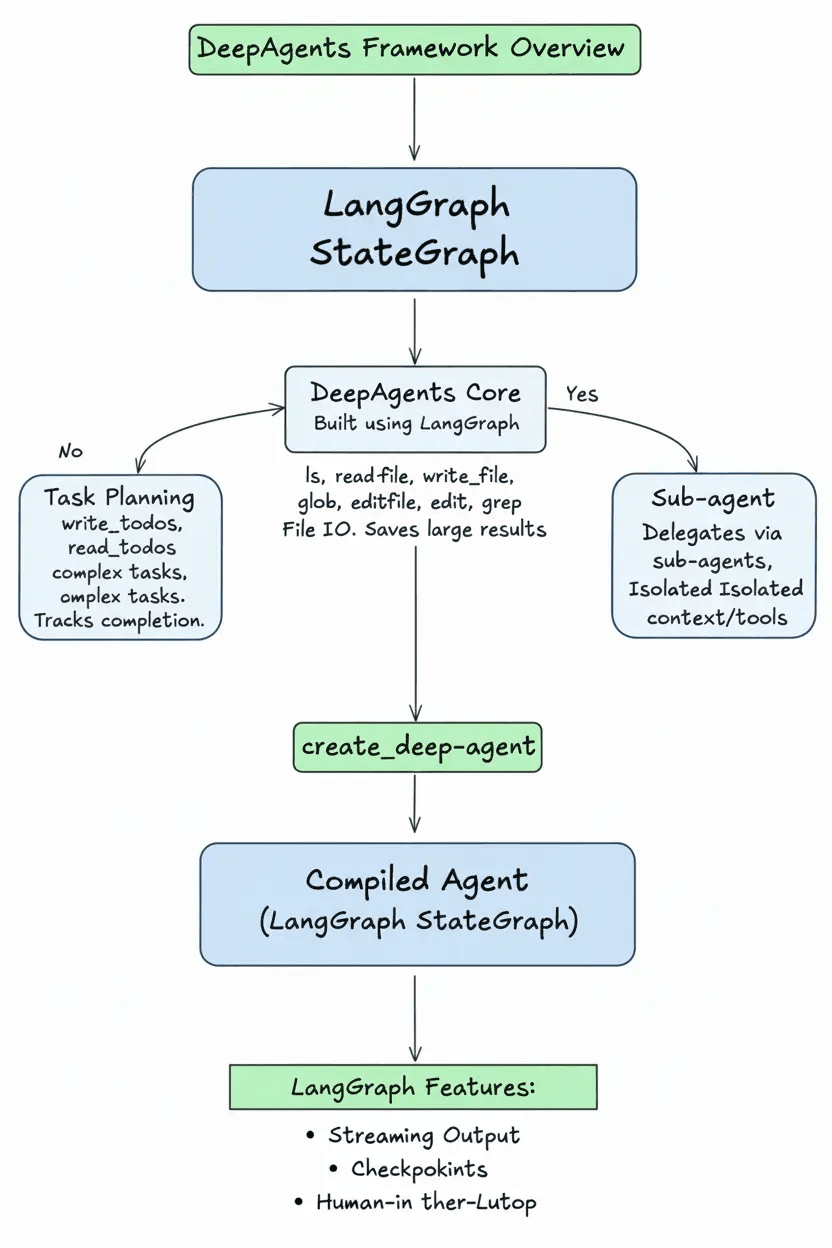
Technically, an agent created with create_deep_agent is a compiled LangGraph StateGraph. (LangGraph is the workflow library developed by the LangChain team, and StateGraph is its core state structure.) Because of this, Deep Agents can directly use LangGraph features like streaming output, checkpointing, and human-in-the-loop interaction.
So what makes Deep Agents useful in practice?
Long-running agent tasks often face problems such as context limits, high token costs, and unreliable execution. Deep Agents helps solve these issues by making agent workflows more structured and easier to manage. By reducing unnecessary context growth, it lowers token usage and keeps long-running tasks more cost-efficient.
It also makes complex, multi-step tasks easier to organize. Subtasks can run independently without interfering with each other, which improves reliability. At the same time, the system is flexible, allowing developers to customize and extend it as their agents grow from simple experiments to production applications.
Customization in Deep Agents
A general framework cannot cover every industry or business need. Deep Agents is designed to be flexible, so developers can adjust it to fit their own use cases.
With customization, you can:
Connect your own internal tools and APIs
Define domain-specific workflows
Make sure the agent follows business rules
Support memory and knowledge sharing across sessions
Here are the main ways you can customize Deep Agents:
System Prompt Customization
You can add your own system prompt on top of the default instructions provided by middleware. This is useful for defining domain rules and workflows.
A good custom prompt may include:
- Domain workflow rules
Example: “For data analysis tasks, always run exploratory analysis before building a model.”
- Specific examples
Example: “Combine similar literature search requests into one todo item.”
- Stopping rules
Example: “Stop if more than 100 tool calls are used.”
- Tool coordination guidance
Example: “Use grep to find code locations, then use read_file to view details.”
Avoid repeating instructions that middleware already handles, and avoid adding rules that conflict with the default behavior.
Tools
You can add your own tools to the built-in toolset. Tools are defined as normal Python functions, and their docstrings describe what they do.
from deepagents import create_deep_agent
def internet_search(query: str) -> str:
    """Run a web search"""
    return tavily_client.search(query)
agent = create_deep_agent(tools=[internet_search])
Deep Agents also supports tools that follow the Model Context Protocol (MCP) standard through langchain-mcp-adapters.
from langchain_mcp_adapters.client import MultiServerMCPClient
from deepagents import create_deep_agent
async def main():
    mcp_client = MultiServerMCPClient(...)
    mcp_tools = await mcp_client.get_tools()
    agent = create_deep_agent(tools=mcp_tools)
    async for chunk in agent.astream({"messages": [{"role": "user", "content": "..."}]}):
        chunk["messages"][-1].pretty_print()
Middleware
You can write custom middleware to:
Add or modify tools
Adjust prompts
Hook into different stages of the agent’s execution
from langchain_core.tools import tool
from deepagents import create_deep_agent
from deepagents.middleware import AgentMiddleware
@tool
def get_weather(city: str) -> str:
    """Get the weather in a city."""
    return f"The weather in {city} is sunny."
class WeatherMiddleware(AgentMiddleware):
    tools = [get_weather]
agent = create_deep_agent(middleware=[WeatherMiddleware()])
Deep Agents also includes built-in middleware for planning, sub-agent management, and execution control.
| Middleware | Function |
|---|---|
| TodoListMiddleware | Provides write_todos and read_todos tools to manage task lists |
| FilesystemMiddleware | Provides file operation tools and automatically saves large tool outputs |
| SubAgentMiddleware | Provides the task tool to delegate work to sub-agents |
| SummarizationMiddleware | Automatically summarizes when context exceeds 170k tokens |
| AnthropicPromptCachingMiddleware | Enables prompt caching for Anthropic models |
| PatchToolCallsMiddleware | Fixes incomplete tool calls caused by interruptions |
| HumanInTheLoopMiddleware | Configures tools that require human approval |
Sub-agents
The main agent can delegate subtasks to sub-agents using the task tool. Each sub-agent runs in its own context window and has its own tools and system prompt.
from deepagents import create_deep_agent
research_subagent = {
    "name": "research-agent",
    "description": "Used to research in-depth questions",
    "prompt": "You are an expert researcher",
    "tools": [internet_search],
    "model": "openai:gpt-4o",  # Optional, defaults to main agent model
}
agent = create_deep_agent(subagents=[research_subagent])
For advanced use cases, you can even pass in a pre-built LangGraph workflow as a sub-agent.
from deepagents import CompiledSubAgent, create_deep_agent
custom_graph = create_agent(model=..., tools=..., prompt=...)
agent = create_deep_agent(
    subagents=[CompiledSubAgent(
        name="data-analyzer",
        description="Specialized agent for data analysis",
        runnable=custom_graph
    )]
)
interrupt_on (Human Approval Control)
You can specify certain tools that require human approval using the interrupt_on parameter. When the agent calls one of these tools, execution pauses until a person reviews and approves it.
from langchain_core.tools import tool
from deepagents import create_deep_agent
from langgraph.checkpoint.memory import MemorySaver
@tool
def delete_file(path: str) -> str:
    """Delete a file from the filesystem."""
    return f"Deleted {path}"
agent = create_deep_agent(
    tools=[delete_file],
    interrupt_on={
        "delete_file": {
            "allowed_decisions": ["approve", "edit", "reject"]
        }
    },
    checkpointer=MemorySaver()
)
Backend Customization (Storage)
You can choose different storage backends to control how files are handled. Current options include:
StateBackend (temporary storage)
FilesystemBackend (local disk storage)
StoreBackend(persistent storage)、CompositeBackend(hybrid routing)。
from deepagents import create_deep_agent
from deepagents.backends import FilesystemBackend
agent = create_deep_agent(
    backend=FilesystemBackend(root_dir="/path/to/project")
)
By changing the backend, you can adjust file storage behavior without changing the overall system design.
Why Use Deep Agents with Milvus for AI Agents?
In real applications, agents often need memory that lasts across sessions. For example, they may need to remember user preferences, build up domain knowledge over time, record feedback to adjust behavior, or keep track of long-term research tasks.
By default, Deep Agents uses StateBackend, which only stores data during a single session. When the session ends, everything is cleared. This means it cannot support long-term, cross-session memory.
To enable persistent memory, we use Milvus as the vector database together with StoreBackend. Here’s how it works: important conversation content and tool results are converted into embeddings (numerical vectors that represent meaning) and stored in Milvus. When a new task starts, the agent performs semantic search to retrieve related past memories. This allows the agent to “remember” relevant information from previous sessions.
Milvus is well suited for this use case because of its compute-storage separation architecture. It supports:
Horizontal scaling to tens of billions of vectors
High-concurrency queries
Real-time data updates
Production-ready deployment for large-scale systems
Technically, Deep Agents uses CompositeBackend to route different paths to different storage backends:
| Path | Backend | Purpose |
|---|---|---|
| /workspace/, /temp/ | StateBackend | Temporary data, cleared after the session |
| /memories/, /knowledge/ | StoreBackend + Milvus | Persistent data, searchable across sessions |
With this setup, developers only need to save long-term data under paths like /memories/. The system automatically handles cross-session memory. Detailed configuration steps are provided in the section below.
Hands-on: Build an AI Agent with Long-Term Memory Using Milvus and Deep Agents
This example shows how to give a DeepAgents-based agent persistent memory using Milvus.
Step 1: Install dependencies
pip install deepagents tavily-python langchain-milvus
Step 2: Set up the memory backend
from deepagents.backends import CompositeBackend, StateBackend, StoreBackend
from langchain_milvus.storage import MilvusStore
# from langgraph.store.memory import InMemoryStore # for testing only
# Configure Milvus storage
milvus_store = MilvusStore(
    collection_name="agent_memories",
    embedding_service=... # embedding is required here, or use MilvusStore default configuration
)
backend = CompositeBackend(
    default=StateBackend(),
    routes={"/memories/": StoreBackend(store=InMemoryStore())}
)
Step 3: Create the agent
from tavily import TavilyClient
import os
tavily_client = TavilyClient(api_key=os.environ["TAVILY_API_KEY"])
def internet_search(query: str, max_results: int = 5) -> str:
    """Perform an internet search"""
    results = tavily_client.search(query, max_results=max_results)
    return "\n".join([f"{r['title']}: {r['content']}" for r in results["results"]])
agent = create_deep_agent(
    tools=[internet_search],
    system_prompt="You are a research expert. Write important findings to the /memories/ directory for cross-session reuse.",
    backend=backend
)
# Run the agent
result = agent.invoke({
    "messages": [{"role": "user", "content": "Research the technical features of the Milvus vector database"}]
})
Key Points
- Persistent path
Any files saved under /memories/ will be stored permanently and can be accessed across different sessions.
- Production setup
The example uses InMemoryStore() for testing. In production, replace it with a Milvus adapter to enable scalable semantic search.
- Automatic memory
The agent automatically saves research results and important outputs to the /memories/ folder. In later tasks, it can search and retrieve relevant past information.
Built-in Tools Overview
Deep Agents includes several built-in tools, provided through middleware. They fall into three main groups:
Task Management (TodoListMiddleware)
write_todos
Creates a structured todo list. Each task can include a description, priority, and dependencies.
read_todos
Shows the current todo list, including completed and pending tasks.
File System Tools (FilesystemMiddleware)
ls
Lists files in a directory. Must use an absolute path (starting with /).
read_file
Reads file content. Supports offset and limit for large files.
write_file
Creates or overwrites a file.
edit_file
Replaces specific text inside a file.
glob
Finds files using patterns, such as **/*.py to search for all Python files.
grep
Searches for text inside files.
execute
Runs shell commands in a sandbox environment. Requires the backend to support SandboxBackendProtocol.
Sub-agent Delegation (SubAgentMiddleware)
task
Sends a subtask to a specific sub-agent. You provide the sub-agent name and the task description.
How Tool Outputs Are Handled
If a tool generates a large result, Deep Agents automatically saves it to a file.
For example, if internet_search returns 100KB of content, the system saves it to something like /tool_results/internet_search_1.txt. The agent keeps only the file path in its context. This reduces Token usage and keeps the context window small.
DeepAgents vs. Agent Builder: When Should You Use Each?
Since this article focuses on DeepAgents, it’s also helpful to understand how it compares with Agent Builder, another agent-building option in the LangChain ecosystem.
LangChain offers several ways to build AI agents, and the best choice usually depends on how much control you want over the system.
DeepAgents is designed for building autonomous agents that handle long-running, multi-step tasks. It gives developers full control over how the agent plans tasks, uses tools, and manages memory. Because it is built on LangGraph, you can customize components, integrate Python tools, and modify the storage backend. This makes DeepAgents a good fit for complex workflows and production systems where reliability and flexibility are important.
Agent Builder, in contrast, focuses on ease of use. It hides most of the technical details, so you can describe an agent, add tools, and run it quickly. Memory, tool usage, and human approval steps are handled automatically. This makes Agent Builder useful for quick prototypes, internal tools, or early experiments.
Agent Builder and DeepAgents are not separate systems—they are part of the same stack. Agent Builder is built on top of DeepAgents. Many teams start with Agent Builder to test ideas, then switch to DeepAgents when they need more control. Workflows created with DeepAgents can also be turned into Agent Builder templates so others can reuse them easily.
Conclusion
Deep Agents makes complex agent workflows easier to manage by using three main ideas: task planning, file storage, and sub-agent delegation. These mechanisms turn messy, multi-step processes into structured workflows. When combined with Milvus for vector search, the agent can also keep long-term memory across sessions.
For developers, this means lower Token costs and a more reliable system that can scale from a simple demo to a production environment.
If you’re building AI agents that need structured workflows and real long-term memory, we’d love to connect.
Have questions about Deep Agents or using Milvus as a persistent memory backend? Join our Slack channel or book a 20-minute Milvus Office Hours session to discuss your use case.
- What Is Deep Agents?
- Customization in Deep Agents
- System Prompt Customization
- Tools
- Middleware
- Sub-agents
- interrupt_on (Human Approval Control)
- Backend Customization (Storage)
- Why Use Deep Agents with Milvus for AI Agents?
- Hands-on: Build an AI Agent with Long-Term Memory Using Milvus and Deep Agents
- Step 1: Install dependencies
- Step 2: Set up the memory backend
- Step 3: Create the agent
- Built-in Tools Overview
- Task Management (TodoListMiddleware)
- File System Tools (FilesystemMiddleware)
- Sub-agent Delegation (SubAgentMiddleware)
- How Tool Outputs Are Handled
- DeepAgents vs. Agent Builder: When Should You Use Each?
- Conclusion
On This Page
Try Managed Milvus for Free
Zilliz Cloud is hassle-free, powered by Milvus and 10x faster.
Get StartedLike the article? Spread the word