LangChain 1.0 and Milvus: How to Build Production-Ready Agents with Real Long-Term Memory
LangChain is a popular open-source framework for developing applications powered by large language models (LLMs). It provides a modular toolkit for building reasoning and tool-using agents, connecting models to external data, and managing interaction flows.
With the release of LangChain 1.0, the framework takes a step toward a more production-friendly architecture. The new version replaces the earlier Chain-based design with a standardized ReAct loop (Reason → Tool Call → Observe → Decide) and introduces Middleware for managing execution, control, and safety.
However, reasoning alone isn’t enough. Agents also need the ability to store, recall, and reuse information. That’s where Milvus, an open-source vector database, can play an essential role. Milvus provides a scalable, high-performance memory layer that enables agents to store, search, and retrieve information efficiently via semantic similarity.
In this post, we’ll explore how LangChain 1.0 updates agent architecture, and how integrating Milvus helps agents go beyond reasoning — enabling persistent, intelligent memory for real-world use cases.
Why the Chain-based Design Falls Short
In its early days (version 0.x), LangChain’s architecture centered around Chains. Each Chain defined a fixed sequence and came with prebuilt templates that made LLM orchestration simple and fast. This design was great for quickly building prototypes. But as the LLM ecosystem evolved and real-world use cases grew more complex, cracks in this architecture began to show.
1. Lack of Flexibility
Early versions of LangChain provided modular pipelines such as SimpleSequentialChain or LLMChain, each following a fixed, linear flow—prompt creation → model call → output processing. This design worked well for simple and predictable tasks and made it easy to prototype quickly.
However, as applications grew more dynamic, these rigid templates began to feel restrictive. When business logic no longer fits neatly into a predefined sequence, you are left with two unsatisfying options: force your logic to conform to the framework or bypass it entirely by calling the LLM API directly.
2. Lack of Production-Grade Control
What worked fine in demos often broke in production. The Chains didn’t include the safeguards needed for large-scale, persistent, or sensitive applications. Common issues included:
Context overflow: Long conversations could exceed token limits, causing crashes or silent truncation.
Sensitive data leaks: Personally identifiable information (like emails or IDs) could be inadvertently sent to third-party models.
Unsupervised operations: Agents might delete data or send email without human approval.
3. Lack of Cross-Model Compatibility
Each LLM provider—OpenAI, Anthropic, and many Chinese models—implements its own protocols for reasoning and tool calling. Every time you switched providers, you had to rewrite the integration layer: prompt templates, adapters, and response parsers. This repetitive work slowed development and made experimentation painful.
LangChain 1.0: All-in ReAct Agent
When the LangChain team analyzed hundreds of production-grade agent implementations, one insight stood out: nearly all successful agents naturally converged on the ReAct (“Reasoning + Acting”) pattern.
Whether in a multi-agent system or a single agent performing deep reasoning, the same control loop emerges: alternating between brief reasoning steps with targeted tool calls, then feeding the resulting observations into subsequent decisions until the agent can deliver a final answer.
To build on this proven structure, LangChain 1.0 places the ReAct loop at the core of its architecture, making it the default structure for building reliable, interpretable, and production-ready agents.
To support everything from simple agents to complex orchestrations, LangChain 1.0 adopts a layered design that combines ease of use with precise control:
Standard scenarios: Start with the create_agent() function — a clean, standardized ReAct loop that handles reasoning and tool calls out of the box.
Extended scenarios: Add Middleware to gain fine-grained control. Middleware lets you inspect or modify what happens inside the agent — for example, adding PII detection, human-approval checkpoints, automatic retries, or monitoring hooks.
Complex scenarios: For stateful workflows or multi-agent orchestration, use LangGraph, a graph-based execution engine that provides precise control over logic flow, dependencies, and execution states.
Now let’s break down the three key components that make agent development simpler, safer, and more consistent across models.
1. The create_agent(): A Simpler Way to Build Agents
A key breakthrough in LangChain 1.0 is how it reduces the complexity of building agents to a single function — create_agent(). You no longer need to manually handle state management, error handling, or streaming outputs. These production-level features are now automatically managed by the LangGraph runtime underneath.
With just three parameters, you can launch a fully functional agent:
model — either a model identifier (string) or an instantiated model object.
tools — a list of functions that give the agent its abilities.
system_prompt — the instruction that defines the agent’s role, tone, and behavior.
Under the hood, create_agent() runs on the standard agent loop — calling a model, letting it choose tools to execute, and completing once no more tools are needed:

It also inherits LangGraph’s built-in capabilities for state persistence, interruption recovery, and streaming. Tasks that once took hundreds of lines of orchestration code are now handled through a single, declarative API.
from langchain.agents import create_agent
agent = create_agent(
    model="openai:gpt-4o",
    tools=[get_weather, query_database],
    system_prompt="You are a customer service assistant who helps users check the weather and order information."
)
result = agent.invoke({
    "messages": [{"role": "user", "content": "What’s the weather like in Shanghai today?"}]
})
2. The Middleware: A Composable Layer for Production-Ready Control
Middleware is the key bridge that takes LangChain from prototype to production. It exposes hooks at strategic points in the agent’s execution loop, allowing you to add custom logic without rewriting the core ReAct process.
An agent’s main loop follows a three-step decision process — Model → Tool → Termination:
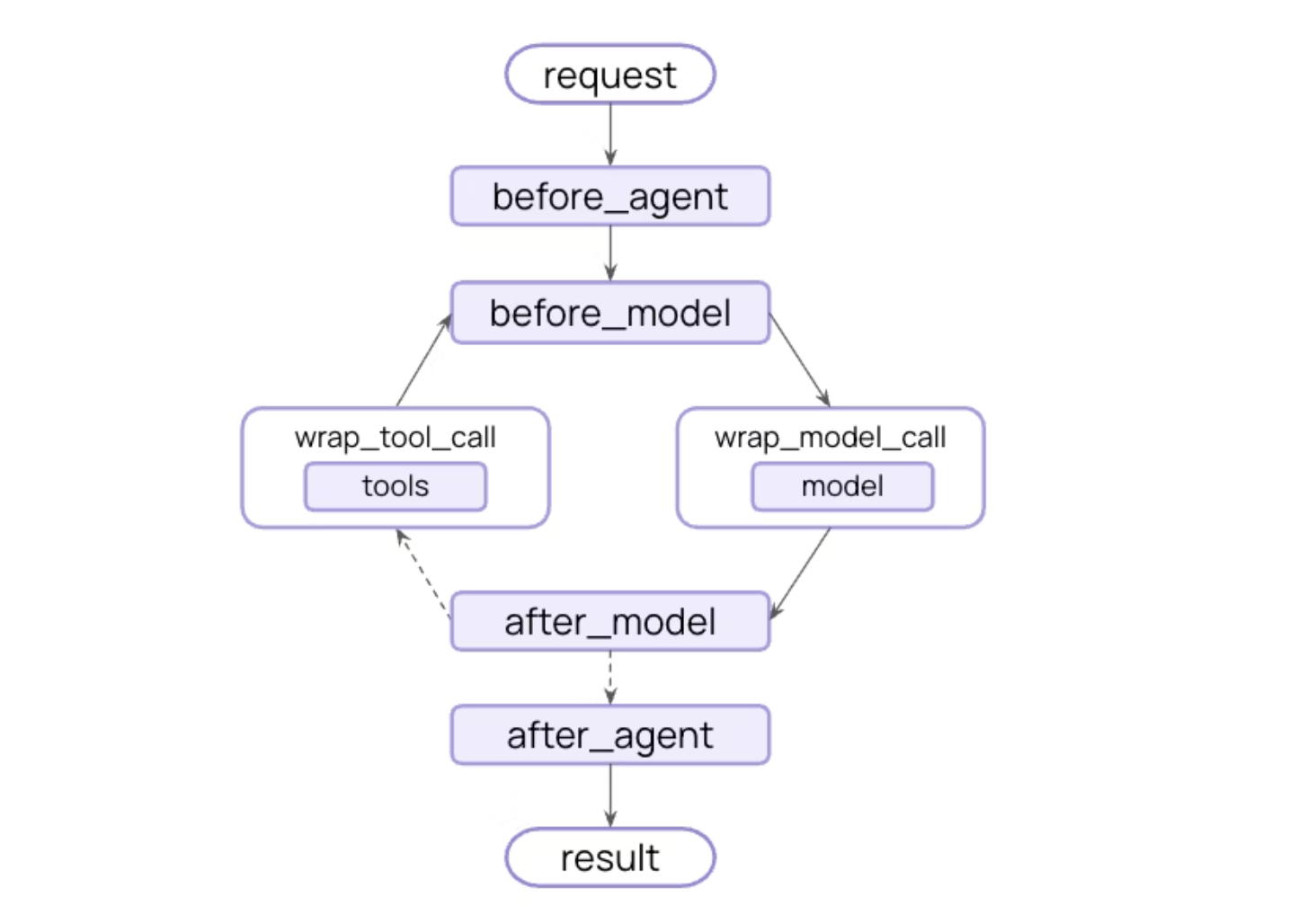
LangChain 1.0 provides a few prebuilt middlewares for common patterns. Here are four examples.
- PII detection: Any application handling sensitive user data
from langchain.agents import create_agent
from langchain.agents.middleware import PIIMiddleware


agent = create_agent(
    model="gpt-4o",
    tools=[],  # Add tools as needed
    middleware=[
        # Redact emails in user input
        PIIMiddleware("email", strategy="redact", apply_to_input=True),
        # Mask credit cards (show last 4 digits)
        PIIMiddleware("credit_card", strategy="mask", apply_to_input=True),
        # Custom PII type with regex
        PIIMiddleware(
            "api_key",
            detector=r"sk-[a-zA-Z0-9]{32}",
            strategy="block",  # Raise error if detected
        ),
    ],
)
- Summarization: Automatically summarize conversation history when approaching token limits.
from langchain.agents import create_agent
from langchain.agents.middleware import SummarizationMiddleware


agent = create_agent(
    model="gpt-4o",
    tools=[weather_tool, calculator_tool],
    middleware=[
        SummarizationMiddleware(
            model="gpt-4o-mini",  #Summarize using a cheaper model
            max_tokens_before_summary=4000,  # Trigger summarization at 4000 tokens
            messages_to_keep=20,  # Keep last 20 messages after summary
        ),
    ],
)
- Tool retry: Automatically retry failed tool calls with configurable exponential backoff.
from langchain.agents import create_agent
from langchain.agents.middleware import ToolRetryMiddleware
agent = create_agent(
    model="gpt-4o",
    tools=[search_tool, database_tool],
    middleware=[
        ToolRetryMiddleware(
            max_retries=3,  # Retry up to 3 times
            backoff_factor=2.0,  # Exponential backoff multiplier
            initial_delay=1.0,  # Start with 1 second delay
            max_delay=60.0,  # Cap delays at 60 seconds
            jitter=True,  # Add random jitter to avoid thundering herd (±25%)

        ),
    ],
)
- Custom Middleware
In addition to the official, prebuilt middleware options, you can also create custom middleware using decorator-based or class-based way.
For example, the snippet below shows how to log model calls before execution:
from langchain.agents.middleware import before_model
from langchain.agents.middleware import AgentState
from langgraph.runtime import Runtime
@before_model
def log_before_model(state: AgentState, runtime: Runtime) -> dict | None:
    print(f"About to call model with {len(state['messages'])} messages")
    return None  # Returning None means the normal flow continues
agent = create_agent(
    model="openai:gpt-4o",
    tools=[...],
    middleware=[log_before_model],
)
3. Structured Output: A Standardized Way to Handle Data
In traditional agent development, structured output has always been difficult to manage. Each model provider handles it differently — for example, OpenAI offers a native Structured Output API, while others only support structured responses indirectly through tool calls. This often meant writing custom adapters for each provider, adding extra work and making maintenance more painful than it should be.
In LangChain 1.0, structured output is handled directly through the response_format parameter in create_agent(). You only need to define your data schema once. LangChain automatically picks the best enforcement strategy based on the model you’re using — no extra setup or vendor-specific code required.
from langchain.agents import create_agent
from pydantic import BaseModel, Field
class WeatherReport(BaseModel):
    location: str = Field(description="City name")
    temperature: float = Field(description="Temperature (°C)")
    condition: str = Field(description="Weather condition")
agent = create_agent(
    model="openai:gpt-4o",
    tools=[get_weather],
    response_format=WeatherReport  # Use the Pydantic model as the response schema
)
result = agent.invoke({"role": "user", "content": "What’s the weather like in Shanghai today??"})
weather_data = result['structured_response']  # Retrieve the structured response
print(f"{weather_data.location}: {weather_data.temperature}°C, {weather_data.condition}")
LangChain supports two strategies for structured output:
1. Provider Strategy: Some model providers natively support structured output through their APIs (e.g. OpenAI and Grok). When such support is available, LangChain uses the provider’s built-in schema enforcement directly. This approach offers the highest level of reliability and consistency, since the model itself guarantees the output format.
2. Tool Calling Strategy: For models that don’t support native structured output, LangChain uses tool calling to achieve the same result.
You don’t need to worry about which strategy is being used — the framework detects the model’s capabilities and adapts automatically. This abstraction lets you switch between different model providers freely without changing your business logic.
How Milvus Enhances Agent Memory
For production-grade agents, the real performance bottleneck often isn’t the reasoning engine — it’s the memory system. In LangChain 1.0, vector databases act as an agent’s external memory, providing long-term recall through semantic retrieval.
Milvus is one of the most mature open-source vector databases available today, purpose-built for large-scale vector search in AI applications. It integrates natively with LangChain, so you don’t have to manually handle vectorization, index management, or similarity search. The langchain_milvus package wraps Milvus as a standard VectorStore interface, allowing you to connect it to your agents with just a few lines of code.
By doing so, Milvus addresses three key challenges in building scalable and reliable agent memory systems:
1. Fast Retrieval from Massive Knowledge Bases
When an agent needs to process thousands of documents, past conversations, or product manuals, simple keyword search just isn’t enough. Milvus uses vector similarity search to find semantically relevant information in milliseconds — even if the query uses different wording. This allows your agent to recall knowledge based on meaning, not just exact text matches.
from langchain.agents import create_agent
from langchain_milvus import Milvus
from langchain_openai import OpenAIEmbeddings
# Initialize the vector database as a knowledge base
vectorstore = Milvus(
    embedding=OpenAIEmbeddings(),
    collection_name="company_knowledge",
    connection_args={"uri": "http://localhost:19530"}  #
)
# Convert the retriever into a Tool for the Agent
agent = create_agent(
    model="openai:gpt-4o",
    tools=[vectorstore.as_retriever().as_tool(
        name="knowledge_search",
        description="Search the company knowledge base to answer professional questions"
    )],
    system_prompt="You can retrieve information from the knowledge base to answer questions."
)
2. Persistent Long-Term Memory
LangChain’s SummarizationMiddleware can condense conversation history when it gets too long, but what happens to all the details that get summarized away? Milvus keeps them. Every conversation, tool call, and reasoning step can be vectorized and stored for long-term reference. When needed, the agent can quickly retrieve relevant memories through semantic search, enabling true continuity across sessions.
from langchain_milvus import Milvus
from langchain.agents import create_agent
from langchain.agents.middleware import SummarizationMiddleware
from langgraph.checkpoint.memory import InMemorySaver
# Long-term memory storage(Milvus)
long_term_memory = Milvus.from_documents(
    documents=[],  # Initially empty; dynamically updated at runtime
    embedding=OpenAIEmbeddings(),
    connection_args={"uri": "./agent_memory.db"}
)
# Short-term memory management(LangGraph Checkpointer + Summarization)
agent = create_agent(
    model="openai:gpt-4o",
    tools=[long_term_memory.as_retriever().as_tool(
        name="recall_memory",
        description="Retrieve the agent’s historical memories and past experiences"
    )],
    checkpointer=InMemorySaver(),  # Short-term memory
    middleware=[
        SummarizationMiddleware(
            model="openai:gpt-4o-mini",
            max_tokens_before_summary=4000  # When the threshold is exceeded, summarize and store it in Milvus
        )
    ]
)
3. Unified Management of Multimodal Content
Modern agents handle more than text — they interact with images, audio, and video. Milvus supports multi-vector storage and dynamic schema, allowing you to manage embeddings from multiple modalities in a single system. This provides a unified memory foundation for multimodal agents, enabling consistent retrieval across different types of data.
# Filter retrievals by source (e.g., search only medical reports)
vectorstore.similarity_search(
    query="What is the patient's blood pressure reading?",
    k=3,
    expr="source == 'medical_reports' AND modality == 'text'"  # Milvus scalar filtering
)
LangChain vs. LangGraph: How to Choose the One That Fits for Your Agents
Upgrading to LangChain 1.0 is an essential step toward building production-grade agents — but that doesn’t mean it’s always the only or best choice for every use case. Choosing the right framework determines how quickly you can combine these capabilities into a working, maintainable system.
Actually, LangChain 1.0 and LangGraph 1.0 can be seen as part of the same layered stack, designed to work together rather than replace each other: LangChain helps you build standard agents quickly, while LangGraph gives you fine-grained control for complex workflows. In other words, LangChain helps you move fast, while LangGraph helps you go deep.
Below is a quick comparison of how they differ in technical positioning:
| Dimension | LangChain 1.0 | LangChain 1.0 |
|---|---|---|
| Abstraction Level | High-level abstraction, designed for standard agent scenarios | Low-level orchestration framework, designed for complex workflows |
| Core Capability | Standard ReAct loop (Reason → Tool Call → Observation → Response) | Custom state machines and complex branching logic (StateGraph + Conditional Routing) |
| Extension Mechanism | Middleware for production-grade capabilities | Manual management of nodes, edges, and state transitions |
| Underlying Implementation | Manual management of nodes, edges, and state transitions | Native runtime with built-in persistence and recovery |
| Typical Use Cases | 80% of standard agent scenarios | Multi-agent collaboration and long-running workflow orchestration |
| Learning Curve | Build an agent in ~10 lines of code | Requires understanding of state graphs and node orchestration |
If you’re new to building agents or want to get a project up and running quickly, start with LangChain. If you already know your use case requires complex orchestration, multi-agent collaboration, or long-running workflows, go straight to LangGraph.
Both frameworks can coexist in the same project — you can start simple with LangChain and bring in LangGraph when your system needs more control and flexibility. The key is to choose the right tool for each part of your workflow.
Conclusion
Three years ago, LangChain started as a lightweight wrapper for calling LLMs. Today, it has grown into a complete, production-grade framework.
At the core, middleware layers provide safety, compliance, and observability. LangGraph adds persistent execution, control flow, and state management. And at the memory layer, Milvus fills a critical gap—providing scalable, reliable long-term memory that allows agents to retrieve context, reason over history, and improve over time.
Together, LangChain, LangGraph, and Milvus form a practical toolchain for the modern agent era—bridging rapid prototyping with enterprise-scale deployment, without sacrificing reliability or performance.
🚀 Ready to give your agent a reliable, long-term memory? Explore Milvus and see how it powers intelligent, long-term memory for LangChain agents in production.
Have questions or want a deep dive on any feature? Join our Discord channel or file issues on GitHub. You can also book a 20-minute one-on-one session to get insights, guidance, and answers to your questions through Milvus Office Hours.
- Why the Chain-based Design Falls Short
- LangChain 1.0: All-in ReAct Agent
- 1\. The create_agent(): A Simpler Way to Build Agents
- 2\. The Middleware: A Composable Layer for Production-Ready Control
- 3\. Structured Output: A Standardized Way to Handle Data
- How Milvus Enhances Agent Memory
- LangChain vs. LangGraph: How to Choose the One That Fits for Your Agents
- Conclusion
On This Page
Try Managed Milvus for Free
Zilliz Cloud is hassle-free, powered by Milvus and 10x faster.
Get StartedLike the article? Spread the word