LangChain is an open-source framework that gives language-model applications a common set of building blocks: chat models, embedding models, document loaders, text splitters, tools, retrievers, and agents. It uses Milvus through the langchain-milvus package, whose Milvus class implements LangChain’s vector-store interface. Your documents are embedded, written to a Milvus collection, and then searched through similarity_search or a retriever that plugs into chains and agents.
The division of work is simple. The embedding model turns text into vectors, Milvus stores those vectors with their text and metadata and runs filtered nearest-neighbor or hybrid search, and the language model writes an answer from whatever the retriever hands it. LangChain is the glue that keeps those three swappable.
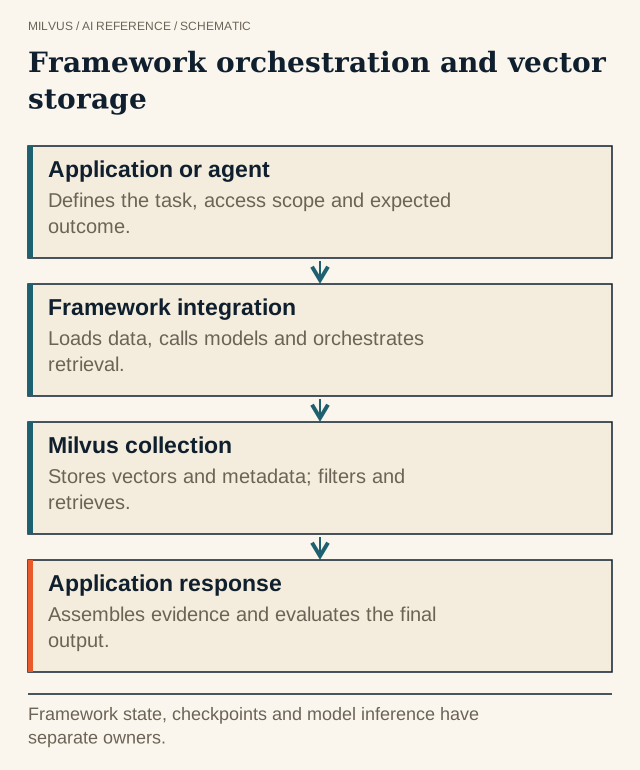 Framework orchestration and vector storage. Framework state, checkpoints and model inference have separate owners.
Which package should you install?
Use the dedicated partner package, not the older class in langchain_community.vectorstores:
pip install -U langchain-milvus langchain-openai
langchain-milvus brings in pymilvus. A local file path as the connection URI (for example ./milvus_demo.db) runs Milvus Lite inside your Python process, which is fine for prototypes and notebooks. For anything shared or larger, point the same code at a Milvus server such as http://localhost:19530, or at a Zilliz Cloud endpoint with a token. Nothing else in the application changes.
A minimal LangChain + Milvus example
The example below creates a vector store, adds documents with explicit IDs and metadata, and runs a filtered search. It uses OpenAI embeddings, but any LangChain Embeddings implementation works.
from langchain_core.documents import Document
from langchain_milvus import Milvus
from langchain_openai import OpenAIEmbeddings

embeddings = OpenAIEmbeddings(model="text-embedding-3-small")

vector_store = Milvus(
    embedding_function=embeddings,
    collection_name="support_docs",
    connection_args={"uri": "http://localhost:19530", "token": "root:Milvus"},
    index_params={"index_type": "HNSW", "metric_type": "COSINE"},
    consistency_level="Strong",
    drop_old=False,
)

docs = [
    Document(page_content="Refunds are issued within 14 days of a return.",
             metadata={"product": "store", "version": "2.1"}),
    Document(page_content="Export reports from Settings > Data > Export.",
             metadata={"product": "analytics", "version": "4.0"}),
]
vector_store.add_documents(documents=docs, ids=["store-refunds-1", "analytics-export-1"])

results = vector_store.similarity_search(
    "How long do refunds take?",
    k=3,
    expr='product == "store"',
)
for doc in results:
    print(doc.metadata["pk"], doc.metadata["version"], doc.page_content)
A few constructor arguments matter more than they look:
drop_olddeletes the existing collection whenTrue. Keep itFalseanywhere real data lives.index_paramschooses the Milvus index and metric, for exampleHNSWwithCOSINE. If you leave it out, the integration creates anAUTOINDEXwith theL2metric, which may not match how your embedding model was trained. See how to choose a vector index and how the distance metrics differ.idsshould be stable IDs from your own system. Without them the store switches to auto-generated IDs, and updating or deleting a specific source document gets much harder.- Metadata fields come from the first batch you insert. Each key becomes a scalar field in the collection. Keys that show up later and are not in the schema get dropped unless you create the store with
enable_dynamic_field=True. Decide the metadata schema up front.
How do metadata filters work?
The expr argument is a Milvus boolean expression, so you get the database’s own filter language (==, in, like, range comparisons, and/or), and Milvus applies it during the search. Prefer that over filtering results in Python. A post-filter can quietly return fewer than k hits, or none, when most of the nearest neighbors belong to another product or tenant. For the performance side, see how metadata filters interact with vector search.
For multi-tenant data, set partition_key_field="tenant" when you create the store so Milvus groups each tenant’s records, and always include a tenant == "..." expression in queries. The tenant value should come from your authentication layer, not from the user’s prompt or a model.
Turning the store into a retriever
Chains and agents consume retrievers, not vector stores. as_retriever wraps the store and forwards search arguments:
retriever = vector_store.as_retriever(
    search_kwargs={"k": 4, "expr": 'product == "store"'}
)
context_docs = retriever.invoke("Can I get a refund after three weeks?")
Pass search_type="mmr" for maximal marginal relevance, which trades a little relevance for less redundancy among the returned chunks. From there the retriever drops into an LCEL chain or a LangGraph agent like any other retriever.
Hybrid search with BM25 in LangChain
Dense embeddings capture meaning but can miss exact tokens such as error codes, SKUs, and names. Milvus 2.5 and later can compute BM25 sparse vectors on the server, and langchain-milvus exposes this through BM25BuiltInFunction:
from langchain_milvus import BM25BuiltInFunction, Milvus
from pymilvus import Function, FunctionType

hybrid_store = Milvus.from_documents(
    documents=docs,
    embedding=embeddings,
    builtin_function=BM25BuiltInFunction(),   # text -> sparse BM25 vector inside Milvus
    vector_field=["dense", "sparse"],
    collection_name="support_docs_hybrid",
    connection_args={"uri": "http://localhost:19530", "token": "root:Milvus"},
    consistency_level="Strong",
    drop_old=True,  # demo only: recreates the collection
)

weighted = Function(
    name="weight",
    input_field_names=[],            # must be empty for rerank functions
    function_type=FunctionType.RERANK,
    params={"reranker": "weighted", "weights": [0.6, 0.4]},
)

hits = hybrid_store.similarity_search("error E1042 during export", k=5, reranker=weighted)
Each query runs a dense search and a BM25 search, and Milvus fuses the two candidate lists. Passing reranker as a rerank Function (Milvus 2.6 and later) is the current way to control the fusion. You can use "reranker": "rrf" for reciprocal rank fusion. The older ranker_type and ranker_params arguments still work but are deprecated, and when no ranker is given the integration weights both fields equally. BM25 full-text search needs Milvus Standalone, Distributed, or Zilliz Cloud. Milvus Lite does not support it. For when hybrid retrieval pays off, see what hybrid search is and when to use it.
Updating and deleting documents
RAG corpora change. Because you control the IDs, replacing a document is an upsert with the same IDs, and removing one is vector_store.delete(ids=[...]). You can also delete with a filter, such as vector_store.delete(expr='version == "2.0"') to retire every chunk from an old release. Test both paths before launch. A pipeline that only appends will slowly fill the index with stale chunks that still look relevant, so plan incremental updates from the start.
What LangChain does not do for you
The integration hides plumbing, not decisions. You still choose the embedding model and its dimension, the chunking strategy, the index type, the filter schema, and how you evaluate retrieval. A practical habit is to log the IDs returned for each query before generation. Then you can tell a retrieval miss from a generation mistake, and compare similarity_search results against a direct MilvusClient.search on the same collection when results look off. Measure Recall@k and source correctness on a small labeled set as described in how to evaluate retrieval quality.
If you need features the vector-store wrapper does not expose, such as a custom schema with several vector fields, special index parameters, or bulk import, create and manage the collection with PyMilvus and keep LangChain for orchestration.
Next steps
Run the full RAG with Milvus and LangChain tutorial, then try full-text search with LangChain and Milvus for the hybrid setup. If you have no Milvus server yet, the Milvus Quickstart gets one running in minutes. Zilliz Cloud gives you a managed endpoint that works with the same uri and token arguments.
Related reading
- How do you choose an AI framework for a Milvus application?
- What does LlamaIndex do, and where does Milvus fit?
- How do LangGraph state and Milvus retrieval work together?
- How do you choose an embedding model for retrieval?