PyMilvus is the official Python SDK for Milvus, and MilvusClient is its main interface: one object that connects to Milvus Lite, a self-hosted Milvus server, or Zilliz Cloud and exposes methods such as create_collection, insert, upsert, search, query, and delete. A reproducible workflow keeps everything that defines your retrieval behavior in code: the pinned client version, the explicit schema, the index parameters, and a small test fixture that proves search returns what you expect.
That last part is what separates a demo from an application. A notebook that once returned plausible results tells you little after the next schema change, embedding-model upgrade, or Milvus release. A script that creates a known collection, writes known records, and checks known results tells you immediately.
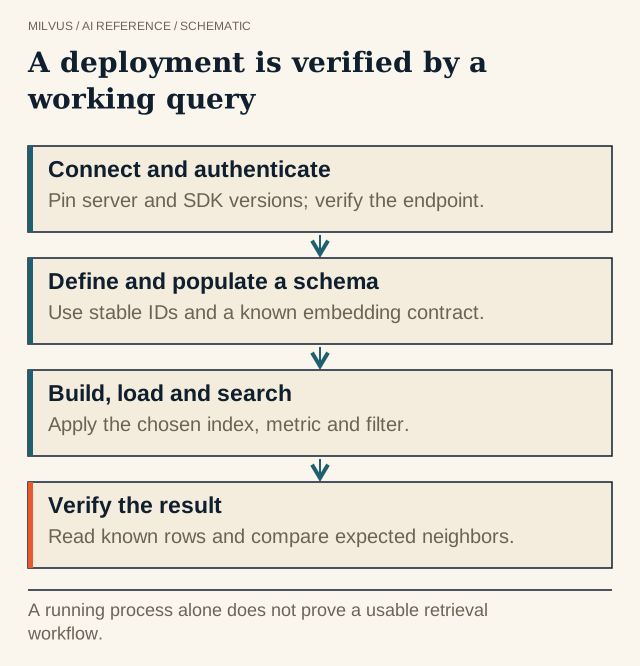 A deployment is verified by a working query. A running process alone does not prove a usable retrieval workflow.
Install and pin PyMilvus
pip install -U pymilvus            # latest release, includes Milvus Lite
pip install pymilvus==3.0.2        # pinned to match a Milvus 3.0.x server
The Milvus docs recommend installing the PyMilvus version that matches your Milvus server release. Pin it in requirements.txt or your lock file, next to the Milvus version you deploy, so a fresh environment cannot silently pick up a different client. If you also want the embedding and reranking wrappers from the Milvus Model library, install the pymilvus[model] extra.
Connect: Milvus Lite, server, or Zilliz Cloud
The same MilvusClient code runs against every deployment. Only the connection arguments change:
import os
from pymilvus import MilvusClient

# Milvus Lite: a local file, good for notebooks and unit tests
client = MilvusClient("./milvus_demo.db")

# Milvus Standalone or Distributed
client = MilvusClient(uri="http://localhost:19530", token="username:password")

# Zilliz Cloud: public endpoint plus API key
client = MilvusClient(uri=os.environ["MILVUS_URI"], token=os.environ["MILVUS_TOKEN"])
Read the URI and token from environment variables or your secrets manager rather than hard-coding them, and give each environment a Milvus user whose privileges match its job.
MilvusClient vs. the ORM API. Older tutorials use connections.connect() and the Collection class. That ORM-style API still ships in PyMilvus, but the current Milvus documentation and Quickstart are written for MilvusClient. Start new code there, and when you copy an older example, translate it instead of mixing both styles in one module. For asyncio applications, PyMilvus also provides an AsyncMilvusClient with the same method names.
Quick setup vs. an explicit schema
The fastest path is quick setup:
client.create_collection(collection_name="demo_collection", dimension=768)
This creates an id primary key, a vector field, COSINE as the metric, and a dynamic field for everything else. It is ideal for a first experiment and a poor fit for an application, because the important decisions (key type, field types, index, filterable metadata) are made for you and are invisible in your code.
For anything you plan to keep, declare the schema and indexes yourself.
A complete MilvusClient walkthrough
The example below builds a small multi-tenant document collection. Every call and parameter name follows the current Milvus documentation.
1. Define the schema
from pymilvus import MilvusClient, DataType

schema = MilvusClient.create_schema(auto_id=False, enable_dynamic_field=False)
schema.add_field(field_name="doc_id", datatype=DataType.INT64, is_primary=True)
schema.add_field(field_name="embedding", datatype=DataType.FLOAT_VECTOR, dim=768)
schema.add_field(field_name="text", datatype=DataType.VARCHAR, max_length=4096)
schema.add_field(field_name="tenant", datatype=DataType.VARCHAR, max_length=64)
schema.add_field(field_name="doc_version", datatype=DataType.INT64)
A few choices here are deliberate. auto_id=False means your application supplies stable IDs that map back to the source document, which makes updates, deletes, and retries safe. Primary keys can be INT64 or VARCHAR. dim must equal the output size of your embedding model. Turning the dynamic field off keeps the schema strict, so a typo in a field name fails loudly instead of being stored as a stray key. Record which embedding model produced the vectors, for example in the collection name or your deployment config, so vectors from an incompatible model never end up side by side.
2. Prepare indexes and create the collection
index_params = client.prepare_index_params()
index_params.add_index(
    field_name="embedding",
    index_type="HNSW",
    metric_type="COSINE",
    params={"M": 16, "efConstruction": 200},
)
index_params.add_index(field_name="tenant", index_type="INVERTED")

client.create_collection(
    collection_name="docs_v1",
    schema=schema,
    index_params=index_params,
    consistency_level="Bounded",
)
print(client.get_load_state(collection_name="docs_v1"))
When you pass index_params to create_collection, Milvus builds the indexes and loads the collection right away, so get_load_state should report it as loaded. If you create the collection without indexes, you must add them and call load_collection before searching. AUTOINDEX is a valid choice if you prefer Milvus to pick index settings; the index guide explains the trade-offs between HNSW, IVF, DiskANN, and others.
3. Insert data
rows = [
    {"doc_id": 1, "embedding": embed("Reset a password"), "text": "...", "tenant": "acme", "doc_version": 3},
    {"doc_id": 2, "embedding": embed("Rotate API keys"),   "text": "...", "tenant": "acme", "doc_version": 3},
    {"doc_id": 3, "embedding": embed("Reset a password"), "text": "...", "tenant": "globex", "doc_version": 1},
]
res = client.insert(collection_name="docs_v1", data=rows)
Rows are plain dictionaries keyed by field name. embed() stands in for your embedding model. Batch inserts (hundreds to thousands of rows per call) rather than sending one row per request. For very large initial loads, the Milvus bulk-import path is usually faster than streaming inserts.
4. Search with a metadata filter
hits = client.search(
    collection_name="docs_v1",
    data=[embed("how do I change my password?")],
    anns_field="embedding",
    limit=5,
    filter="tenant == {tenant} and doc_version >= {min_version}",
    filter_params={"tenant": "acme", "min_version": 3},
    search_params={"metric_type": "COSINE", "params": {"ef": 64}},
    output_fields=["text", "tenant", "doc_version"],
)
for hit in hits[0]:
    print(hit["id"], hit["distance"], hit["entity"]["tenant"])
search returns one result list per query vector, and each hit carries the primary key, the distance or similarity score, and the requested output fields. filter_params fills placeholders in the filter expression. That keeps user input out of string concatenation, and Milvus documents that templating reduces parsing time for large or complex filters such as long IN lists. ef controls HNSW search effort: higher values raise recall and latency.
5. Query, get, upsert, and delete
client.query(collection_name="docs_v1", filter='tenant == "acme"',
             output_fields=["doc_id", "doc_version"], limit=100)
client.get(collection_name="docs_v1", ids=[1, 2], output_fields=["text"])

client.upsert(collection_name="docs_v1", data=[
    {"doc_id": 2, "embedding": embed("Rotate API keys safely"), "text": "...", "tenant": "acme", "doc_version": 4},
])
client.delete(collection_name="docs_v1", ids=[3])
client.delete(collection_name="docs_v1", filter='tenant == "globex"')
query returns entities that match a scalar filter (no vector needed), and get fetches by primary key. For very large result sets, query_iterator pages through them in batches. By default upsert replaces the whole entity with the same primary key. Passing partial_update=True merges only the fields you send into the stored entity. delete accepts either primary keys or a filter expression.
How do consistency levels affect your tests?
Milvus offers four consistency levels: Strong, Bounded (the default), Session, and Eventually. You can set one per collection at creation time and override it per search or query call with consistency_level=....
Under Bounded, a search issued immediately after an insert may not see that insert yet. That is fine for most production traffic and a frequent source of flaky tests. In a fixture that writes and then immediately asserts, pass consistency_level="Strong" on the verifying search or query so the check waits for the write to become visible. Keep production calls on the level you actually intend to run with, and measure freshness under that level.
Build a small behavioral fixture
The most useful PyMilvus artifact a team can own is a short test that runs in CI against Milvus Lite or a disposable server:
- Create an isolated collection (for example
test_docs_<random suffix>) with the production schema and index parameters. - Insert a handful of fixed records: true matches, hard negatives that look similar but are wrong, and a record from another tenant or an old document version.
- Search with the production filter and
consistency_level="Strong", then assert the expected IDs come back and the excluded ones do not. - Upsert one record and delete another, then assert the results change as expected.
- Drop only the test collection when done.
Run it whenever you upgrade PyMilvus or Milvus, change the embedding model, or touch the schema. Never point copy-pasted examples that call drop_collection or filter-based delete at a shared or production collection.
Handle timeouts and retries deliberately
Calls accept a timeout argument, and a timeout means the client stopped waiting, not that the server did nothing. A write may still have been applied. Design writes so retrying them is safe: use your own stable primary keys and prefer upsert for writes that may be replayed, because it replaces the entity with that key. Reconcile by ID after a partial failure instead of assuming a failed call changed nothing.
Related reading
- How do you get from a Milvus deployment to the first verified query?
- What does the released Milvus Model library actually support?
- How do metadata filters interact with vector search?
- How do you handle incremental updates in a vector database?
- What does eventual consistency mean for vector search?
- How can Attu help you inspect and manage Milvus?
- What does LangChain do, and how does it use Milvus?
Next step
Run the MilvusClient Quickstart end to end with Milvus Lite, then swap the URI for a Milvus server or a Zilliz Cloud cluster. For complete applications such as RAG and image search built on the same client, browse the Milvus Bootcamp.