The shortest path from zero to a working Milvus query is three steps: pick a deployment mode (Milvus Lite, Standalone, or Distributed), connect with MilvusClient, and run a search against a small fixture whose correct answer you already know. The installation is finished when that query returns the expected IDs, not when a container reports healthy. Everything after that point, from adding a framework to scaling out, can be measured against the same baseline.
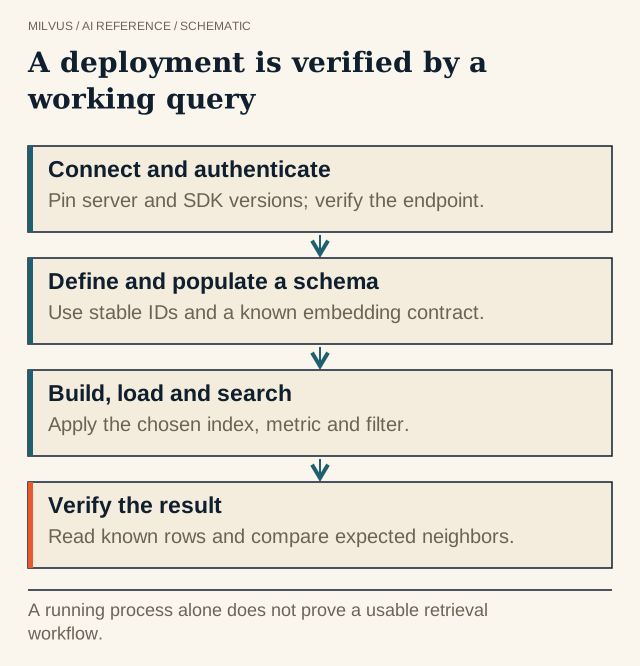 A deployment is verified by a working query. A running process alone does not prove a usable retrieval workflow.
Which Milvus deployment mode should you install?
Milvus ships in three shapes that share one client API, so code written against one usually runs against the others with a different uri. What changes is who runs the server, how much data it is meant to hold, and what features are available.
| Mode | How it runs | Suggested scale (per the Milvus docs) | Good for |
|---|---|---|---|
| Milvus Lite | Python library inside your process, data in a local file | Up to a few million vectors | Notebooks, prototypes, CI fixtures, edge devices |
| Milvus Standalone | Single server: Docker script or Docker Compose | Up to about 100 million vectors | Local development against a real server, small production |
| Milvus Distributed | Kubernetes cluster via Helm or Milvus Operator | 100 million to tens of billions of vectors | Large or high-traffic production |
| Zilliz Cloud | Managed Milvus endpoint | Elastic | Teams that want the database without operating it |
Milvus Lite deserves a caveat. It supports a reduced feature set: its docs list FLAT as the index type, and it does not support partitions, partition keys, users and roles, aliases, or configurable shards and consistency levels. That is fine for learning the API, but it means some tests you write against Lite will not exercise the behavior you will run in production.
Standalone cannot be upgraded online into a cluster, so if you expect to need Distributed, plan for a data migration rather than a config change.
How do you install each mode?
Milvus Lite is bundled with the Python SDK:
pip install -U pymilvus[milvus-lite]
from pymilvus import MilvusClient
client = MilvusClient("./milvus_demo.db")   # a local file path
Lite runs on Ubuntu 20.04+ and macOS 11+ (x86_64 and arm64).
Milvus Standalone with Docker uses an install script that embeds etcd and the Woodpecker write-ahead log, so there are no extra services to wire up:
curl -sfL https://raw.githubusercontent.com/milvus-io/milvus/master/scripts/standalone_embed.sh -o standalone_embed.sh
bash standalone_embed.sh start
The API listens on port 19530, and the built-in WebUI is at http://127.0.0.1:9091/webui/. Data lands in volumes/milvus under the current directory, and standalone_embed.sh stop, restart, upgrade, and delete manage the lifecycle. The docs point you to Docker Compose instead if you plan to use backup tooling; the Compose file starts three containers (milvus-etcd, milvus-minio, milvus-standalone), so object storage is an explicit service you can inspect.
Before you start, check the prerequisites: a CPU with SSE4.2/AVX/AVX2/AVX-512 support, 8 GB of RAM minimum (16 GB recommended) for Standalone, SSD storage, and Docker 19.03+ on Linux or Docker Desktop on macOS and Windows (via WSL 2). A container that crash-loops with “illegal instruction” on a VM usually means the hypervisor is hiding AVX from the guest.
Milvus Distributed goes on Kubernetes with the zilliztech/milvus-helm chart or the Milvus Operator. You need a cluster with a StorageClass, and the chart deploys etcd, MinIO, and the message queue (Woodpecker by default; Pulsar and Kafka are alternatives). Use the sizing tool to pick resources before you install rather than after the first OOM.
Zilliz Cloud skips installation: create a cluster, then pass its endpoint and an API key as uri and token.
What does a “verified” first query look like?
A health check proves the process is up. It does not prove the data path works. Build a tiny acceptance fixture instead:
- Define the data contract. Pick five to twenty documents with stable primary keys, a couple of metadata fields, and embeddings from one recorded model revision. Write down the dimension and the metric.
- Create, insert, search. The quickstart flow is enough:
create_collection(collection_name=..., dimension=...),insert(...), thensearch(..., limit=3, output_fields=["text", "subject"]). Choose a query whose nearest neighbors you can predict and assert on the returned IDs, not just that the list is non-empty. - Exercise filters. Run
query(filter="subject == 'history'")and a filtered search, and confirm that excluded records never appear. - Exercise mutation. Delete by ID and by filter, upsert one record, and check what becomes visible under the consistency level you plan to use (see eventual consistency in Milvus).
- Exercise durability. For Standalone or Distributed, restart the service and repeat the query. Confirm data lives on a mounted volume or real object storage, not in a container’s disposable filesystem.
- Record the environment. Save the server version,
pymilvusversion, endpoint, collection settings, and the exact command sequence so a teammate can reproduce the result.
For a managed endpoint, add network reachability and credential checks: connect with a least-privileged user and confirm the operations you need are allowed and the ones you do not need are denied. The Milvus security and RBAC guide covers how to set that up.
Common first-run problems
- Connection refused on 19530. The container is still starting, or the port is not published. Check
docker compose psand the logs before changing client code. - Dimension mismatch on insert. The collection was created with one dimension and the embedding model produces another. Pin the model and assert
len(vector)in the fixture. - Search returns nothing after insert. The collection is not loaded, or the read ran under a consistency level that had not yet seen the write.
- Feature works on Lite but not on the server, or vice versa. Lite and the server do not share an identical feature set. Run the fixture on the target mode early.
How do you move from Lite to a server or to the cloud?
Moving up a tier is a migration, not a flag. Lite includes a dump command that exports a collection for import into another Milvus deployment or Zilliz Cloud:
milvus-lite dump -d ./milvus_demo.db -c demo_collection -p ./data_dir
Treat the source documents, primary keys, metadata, and embedding configuration as the real system of record, independent of any local file. After replaying data into the target, compare row counts, sampled field values, filtered results, and delete behavior against your fixture, then run the same queries under concurrent load. Keep the source copy until the target passes. The CDC and migration guide covers larger moves.
Where to go next
Once the fixture passes, add one thing at a time and compare against the saved baseline: a framework such as LangChain, BM25 full-text search, or a reranker. The PyMilvus application workflow shows how to keep that loop reproducible, and capacity planning helps you size the production deployment. If you would rather not run the cluster yourself, Zilliz Cloud runs managed Milvus, and the comparison of managed, BYOC, and self-hosted options lays out the trade-offs.
To start right now, follow the Milvus Quickstart.