Securing a Milvus application takes three layers that answer three different questions. Authentication answers “who is connecting?” with a username and password (or API key on Zilliz Cloud). Role-based access control (RBAC) answers “which operations may this identity run, on which databases and collections?” through users, roles, privileges, and privilege groups. Row-level eligibility, usually a tenant or ACL filter that your application enforces, answers “which records may this end user see?” Passing one layer says nothing about the others, which is why a correct login test can coexist with a cross-tenant data leak.
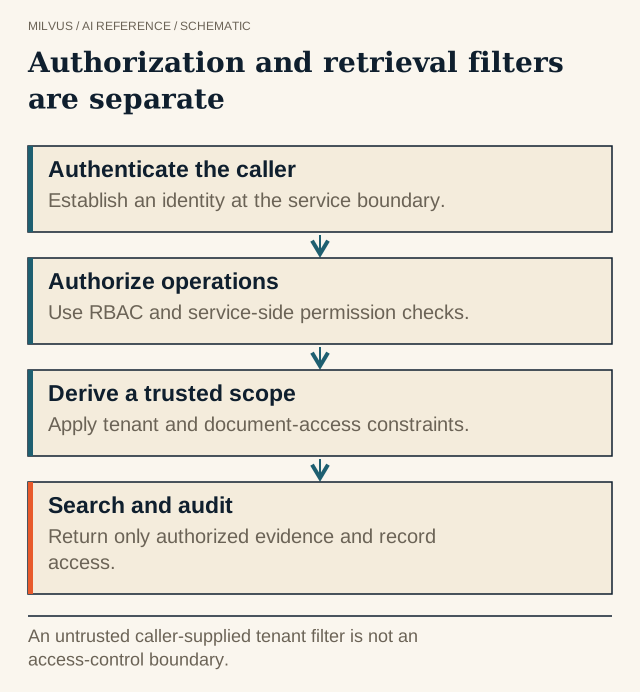 Authorization and retrieval filters are separate. An untrusted caller-supplied tenant filter is not an access-control boundary.
How do you turn on authentication in Milvus?
Authentication is off by default in self-hosted Milvus. Enable it by setting common.security.authorizationEnabled: true in milvus.yaml (Docker Compose), in values.yaml (Helm), or in the Milvus custom resource (Operator). Milvus creates a root user with the password Milvus on first start, and clients authenticate with a token in user:password form:
from pymilvus import MilvusClient

client = MilvusClient(uri="http://localhost:19530", token="root:Milvus")
Change the root password immediately with update_password(), and use root only for administration. If an admin password is lost, the common.security.superUsers setting lets designated users reset passwords without the old one. Application services should each get their own user.
Encrypt the connection as well. Milvus supports one-way TLS (tlsMode: 1, server certificate only) and mutual TLS (tlsMode: 2, client certificates too), plus optional internal TLS between components. On the client side, PyMilvus takes secure=True with the matching certificate paths.
How does Milvus RBAC work?
Milvus RBAC has five pieces:
- Resources at three levels: the instance (cluster), a database, or a collection.
- Privileges, each permitting one operation, such as
Search,Query, orInsert. - Privilege groups that bundle privileges so you grant one name instead of a dozen.
- Roles that hold privileges and groups on specific resources.
- Users that are granted one or more roles.
Two roles are built in: admin, which can do everything, and public. Milvus also ships nine built-in privilege groups that cover most needs:
| Level | Read only | Read and write | Admin |
|---|---|---|---|
| Collection | CollectionReadOnly | CollectionReadWrite | CollectionAdmin |
| Database | DatabaseReadOnly | DatabaseReadWrite | DatabaseAdmin |
| Cluster | ClusterReadOnly | ClusterReadWrite | ClusterAdmin |
When those do not fit, create_privilege_group() and add_privileges_to_group() let you define your own.
A least-privilege setup for a RAG service
Most retrieval applications need three identities: an ingestion worker that writes, a query service that only reads, and an operator who manages schema. Here is the read-only query service:
client.create_user(user_name="rag_query", password="<from-secret-manager>")
client.create_role(role_name="rag_reader")

# Read access to one collection in one database
client.grant_privilege_v2(
    role_name="rag_reader",
    privilege="CollectionReadOnly",
    collection_name="support_docs",
    db_name="prod",
)
client.grant_role(user_name="rag_query", role_name="rag_reader")
collection_name="*" widens a grant to every collection in a database, and db_name="*" with collection_name="*" widens it to the whole instance. Use wildcards deliberately. The ingestion worker gets CollectionReadWrite on the same collection, and only the operator role gets DatabaseAdmin or ClusterAdmin.
Keep the resulting permission matrix in version control next to your schema, review it when responsibilities change, and revoke roles that are no longer needed. Separate development, staging, and production instances so a test credential can never touch production data.
Why RBAC is not enough for multi-tenant data
RBAC stops at the collection. Within a collection, any user with Search can retrieve any row. That matters because the most scalable multi-tenancy strategies in Milvus, partitions and partition keys, keep many tenants in one collection, and the Milvus docs note that RBAC is not supported at those levels. Database-per-tenant and collection-per-tenant designs do support RBAC, at the cost of lower tenant limits.
So for shared collections the boundary is a filter, and your application must own it:
- Derive the tenant ID from the authenticated session on the server, never from user input or an LLM’s tool arguments.
- Inject it as a mandatory expression (for example
tenant_id == "acme"on a partition-key field) in one shared retrieval function that every path calls, including framework adapters, MCP tools, and rerank or fetch-by-ID steps. - For document-level ACLs, store allowed groups as a scalar or array field and filter on them, keeping the ACL in sync with the source system. See how metadata filters interact with vector search.
- Fail closed: if the tenant or ACL value is missing, return nothing rather than running an unfiltered search.
How should you test it?
Prove the denials, not just the successes:
- Connect with the read-only user and attempt an insert, a drop, and a schema change. Each should fail with a permission error.
- Load two tenants with nearly identical documents and distinct IDs. Ask each tenant for the other’s content through every retrieval path and inspect the returned IDs.
- Send requests with a missing, malformed, or model-generated filter and confirm the fail-closed behavior.
- Confirm credentials never appear in logs or prompts, and that TLS is in force between client and server.
Managed and enterprise options
On Zilliz Cloud the same concepts apply with API keys, cluster users, and managed network and transport controls; review the RBAC and audit features available on your tier. For data-residency or network-isolation requirements, BYOC runs the data plane in your own cloud account, and the managed vs BYOC vs self-hosted comparison covers the trade-offs. For a real example of permission-aware retrieval, read the Credal AI customer story.
To set this up on your own cluster, start with the Milvus RBAC guide.