A scalable embedding pipeline splits the corpus into partitions, runs batched model inference on a pool of GPU (or CPU) workers, writes vectors together with stable IDs and model metadata, and loads the result into a vector database in bulk. The design goals are throughput, idempotent retries, and one consistent model version per index. With Milvus, the last stage is the one most teams under-design: the shape of the files your workers write decides whether a billion-vector load is a single bulk-import job or a week of throttled inserts.
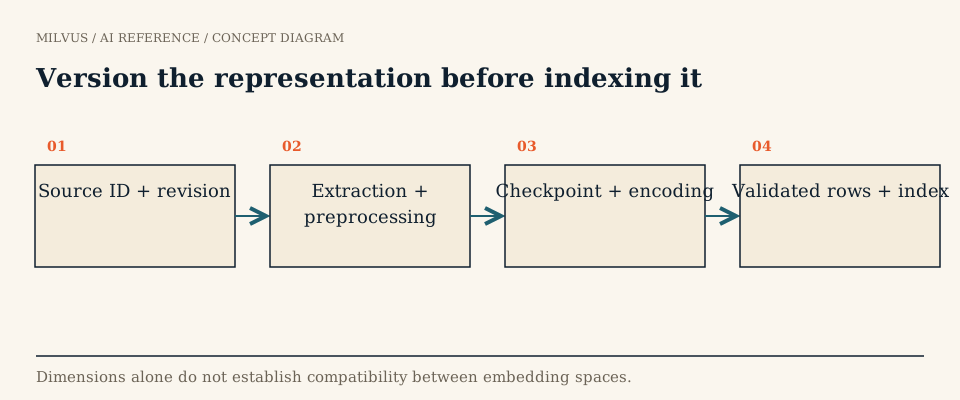 Version the representation before indexing it
What does an embedding pipeline at scale look like?
| Stage | What happens | Typical bottleneck |
|---|---|---|
| Read and partition | List source objects, assign work units (files, row ranges, shards) | Object-store listing, small files |
| Pre-process | Parse, clean, chunk, tokenize | CPU; PDF and HTML parsing |
| Encode | Batched forward pass of the embedding model | GPU memory and compute |
| Validate and write | Check dimension and values, write Parquet with IDs and metadata | Serialization, file size |
| Load into Milvus | Bulk import files, or stream insert/upsert | Import concurrency, index build |
| Verify | Count, sample, run a recall check | Usually skipped, should not be |
Keeping CPU-heavy stages (parsing, tokenization) separate from GPU inference is the single biggest throughput win. If both run in the same process, the GPU idles while the CPU parses PDFs. Frameworks such as Ray Data and Spark make that separation explicit: CPU tasks feed a bounded queue, and a fixed pool of GPU actors consumes it, each holding one loaded copy of the model.
How do you maximize encoder throughput?
- Batch by length. Sort or bucket inputs by token count so a batch of short sentences is not padded to the length of one long document. Optimal batch size depends on sequence length and GPU memory: very large for short inputs, a few hundred for long passages. Measure it rather than guessing.
- Use reduced precision. FP16 or BF16 inference roughly halves memory and speeds up most transformer encoders with negligible quality change; validate on your own retrieval eval set.
- Load the model once per worker. Use long-lived actors or executors, not a model load per task.
- Pick the model for the budget. A smaller model that is fast enough to re-embed the whole corpus regularly often beats a larger one you can afford to run only once. See how to choose an embedding model.
- Use a serving layer when the model is shared. If queries and ingestion use the same model, a dedicated inference server keeps versions aligned; model serving for Milvus covers that setup.
Back-of-envelope sizing helps. If one GPU encodes R chunks per second and the corpus is N chunks, the job takes N / (R × GPUs) seconds, plus I/O. At a billion chunks, the difference between 2,000 and 10,000 chunks per second per GPU is the difference between a week and a day on a small cluster.
Make every record reproducible and retry-safe
Distributed jobs fail partway. Design so that rerunning any work unit produces the same rows:
- Deterministic IDs. Derive the primary key from
source_idpluschunk_index(or a hash of both). A retried partition then overwrites rather than duplicates, provided you load with upsert or deduplicate before import. - Model metadata per row. Store
embedding_model, the model revision, and pre-processing settings (truncation length, normalization, any instruction prefix) as scalar fields. Mixing two model revisions in one vector field silently breaks similarity, and nothing in the database can detect it. - Checkpoint at the work-unit level. Track which partitions finished encoding and which were imported, so a restart resumes rather than starts over.
- Normalize consistently. If the model expects cosine similarity, either L2-normalize vectors before writing or rely on the
COSINEmetric, but do the same thing everywhere.
How do you load embeddings into Milvus at scale?
Bulk import for backfills and large batches
For initial loads and re-embedding the whole corpus, write files and import them rather than calling insert billions of times. Milvus bulk import reads Parquet or JSON files from the object-storage bucket the Milvus instance uses. The documented limits are up to 16 GB per file and up to 1,024 files per import request. Each file’s columns must match the collection schema: same field names, a vector of exactly the declared dimension, and no primary-key column if the collection uses auto_id.
The PyMilvus BulkWriter handles that formatting for you. LocalBulkWriter writes import-ready files to local disk, RemoteBulkWriter writes them straight to S3-compatible storage, and its segment_size setting (512 MB by default) controls file splitting. A pipeline worker can append rows to a writer as it encodes, then the driver submits the resulting file list:
from pymilvus.bulk_writer import bulk_import, get_import_progress

job = bulk_import(url="http://localhost:19530", collection_name="docs", files=file_batches)
# poll get_import_progress(url=..., job_id=...) until the state is Completed or Failed
The Spark connector
If the pipeline already runs on Spark, the Spark-Milvus connector writes a DataFrame directly with .format("milvus") and options such as milvus.collection.name and milvus.collection.vectorField, and its bulkInsertFromSpark utility routes large writes through the bulk-import path instead of row inserts.
Streaming inserts for incremental updates
For new and changed documents after the backfill, call insert or upsert in batches of a few thousand rows from the workers, with a bounded number of concurrent requests so encoders cannot outrun the database. Use upsert with deterministic keys so retries are safe. Incremental updates covers versioning and deletes.
Or let Milvus call the model
For moderate volumes, Milvus 2.6 and later can generate embeddings itself: a TEXTEMBEDDING function declared in the schema calls a provider such as OpenAI, Bedrock, Vertex AI, Voyage AI, Cohere, or a Hugging Face TEI endpoint on insert and on query, so you send raw text and Milvus fills the vector field. It removes a whole pipeline stage and keeps query and document encoders in sync, at the cost of less control over batching and GPU utilization. Your options for generating embeddings alongside Milvus compares the approaches.
Validate before you index, verify after
Before submitting an import, check each file for row count, unique primary keys, the correct dimension, no NaN or infinite values, and a single model revision. After the job reports Completed, compare the collection’s row count with what the pipeline wrote, fetch a random sample by ID, re-encode its text, and confirm the stored vectors match. Then run a small recall check against a FLAT baseline or a labeled query set. A completed import job means the files were read, not that every logical record arrived exactly once with the right vector.
Re-embedding the whole corpus
Model upgrades are the reason pipelines get re-run. Write the new vectors into a fresh collection, bulk import, evaluate on a fixed query set, then switch traffic. Keep the old collection until the new one is proven, and record which model produced which collection, as described in reproducible vector-search experiments. Storing pipeline output as Parquet also lets you re-import without re-encoding; see how Arrow and Parquet fit vector pipelines.
Next step
Prototype the load path first: generate a few thousand embeddings, write them with LocalBulkWriter, and import them into a test collection from the Quickstart. Once file shape and validation are right, scaling the encoder side is mostly adding workers. For managed ingestion at large scale, Zilliz Cloud provides the same import path as a service.