Curating image and video data with vector retrieval means embedding every image, frame, or clip (usually with a CLIP-style model that places pictures and text in the same vector space), then using similarity search to find near-duplicates, pull more examples of rare scenes from a text or image query, balance coverage across clusters, and route suspicious items to review. In Milvus, the key design decision comes first: what one row represents (an image, a sampled frame, or a clip) and which vector fields it carries, because every curation query runs against that unit.
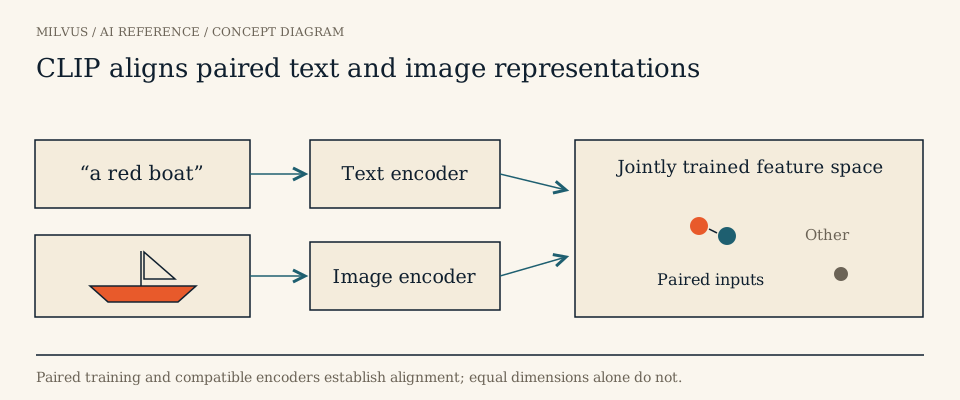 CLIP aligns paired text and image representations
Why image and video curation needs embeddings
Visual datasets are enormous and repetitive. A dashcam fleet records hours of near-identical highway driving, a scraped image set holds the same photo at five resolutions with different watermarks, and a robotics dataset repeats the same pick-and-place motion thousands of times. Pixel hashes catch byte-identical files, and perceptual hashes catch resized or recompressed copies, but neither recognizes that two photos taken a second apart show the same scene, or that a cropped, color-shifted image is a copy.
Embeddings from models such as CLIP or SigLIP map visually and semantically similar content to nearby vectors, and because they are trained on image-text pairs, a text query like “pedestrian crossing at night in rain” lands near matching images. That gives curation three capabilities hashing cannot: semantic deduplication, text-driven mining of rare cases, and density analysis of what the dataset actually contains. Large-scale curation work leans on all three; for example, video curation toolkits cluster clip embeddings with k-means and then compare pairs within each cluster, treating pairs above a cosine similarity around 0.9 as duplicates. See what multimodal embeddings are and which multimodal model families fit image and video for model choice.
Choose the curation unit and schema
| Unit | One row is | Good for | Watch out for |
|---|---|---|---|
| Image | One image file | Photo collections, product catalogs | Many crops or edits of one source |
| Frame | A sampled frame (e.g. 1 fps or keyframes) | Fine-grained scene search, frame dedup | Row count explodes; adjacent frames are trivially similar |
| Clip | A shot or fixed-length segment with one clip-level embedding | Video dedup, training-clip selection | Short events can be averaged away |
Many teams use clips as the curation unit and keep a frame-level collection for drill-down. A clip row in Milvus might look like:
schema.add_field("clip_id", DataType.VARCHAR, is_primary=True, max_length=64)
schema.add_field("recording_id", DataType.VARCHAR, max_length=64)
schema.add_field("start_ts", DataType.INT64)
schema.add_field("end_ts", DataType.INT64)
schema.add_field("scene_tags", DataType.VARCHAR, max_length=256)
schema.add_field("curation_status", DataType.VARCHAR, max_length=16, default_value="pending")
schema.add_field("visual_embedding", DataType.FLOAT_VECTOR, dim=768)
schema.add_field("caption_embedding", DataType.FLOAT_VECTOR, dim=768)
A Milvus collection can hold several vector fields on one row (the multi-vector search guide notes the limit is configurable up to 10 via proxy.maxVectorFieldNum), so keep each modality in its own field instead of collapsing them into one fused vector. Each field can then be queried, thresholded, and audited separately. Store recording_id and timestamps on every row so a selected clip can always be traced back to its source.
How to deduplicate images and video clips
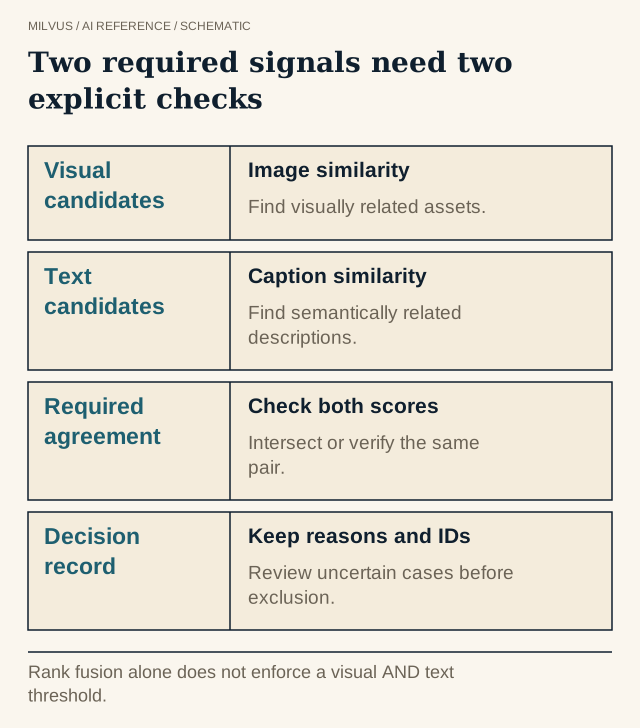 Two required signals need two explicit checks. Rank fusion alone does not enforce a visual AND text threshold.
- Remove exact copies first with a file hash, and resized or recompressed copies with a perceptual hash if you have one.
- Find semantic near-duplicates with range search on
visual_embedding. UnderCOSINE,radiusis the exclusive lower bound andrange_filterthe inclusive upper bound:
client.search(
    collection_name="clips",
    data=[clip_vec],
    anns_field="visual_embedding",
    limit=100,
    filter=f'clip_id != "{clip_id}"',
    search_params={"metric_type": "COSINE", "params": {"radius": 0.9, "range_filter": 1.0}},
    output_fields=["clip_id", "recording_id", "start_ts"],
)
- Treat same-recording neighbors differently. Adjacent clips from one recording are naturally similar. Decide whether to collapse them, keep one per time window, or keep all, and use a filter such as
recording_id != "..."to look specifically for cross-recording copies (re-uploads, stock footage). - Require agreement across modalities when it matters. A visually similar clip with a different caption or transcript can be a different event. Run a second range search on
caption_embeddingwith its own threshold, keep both scores for every candidate, and flag a pair as a duplicate only when it passes both thresholds: take the intersection of the two result sets byclip_id, or, for candidates found by only one search, fetch the other vector and compare the pair directly. Send pairs that pass one check but not the other to review. Do not use hybrid search fusion for this decision: an RRF or weighted ranker merges the two lists into one ranking, so a clip that is a near-perfect visual match with an unrelated caption can still rank high. Fusion is fine for building a review queue, but the duplicate rule itself needs the separate per-modality scores. - Keep the best copy. Pick the survivor by resolution, duration, sharpness, or annotation status, and mark the others
curation_status = "duplicate". On Milvus 2.6.2 and later,upsert(..., partial_update=True)updates that field alone; otherwise an upsert replaces the whole entity and must include every field and vector.
Calibrate the similarity threshold by labeling a few hundred pairs across the score range from your own data. The right cut differs between models, and between images and video. The Milvus image deduplication tutorial is a compact starting point.
How to mine rare scenes and balance coverage
Text-to-image mining. Encode a description of a missing case with the CLIP text encoder and search visual_embedding with it. Combine it with metadata filters (scene_tags like "%night%", a geography, a sensor type) to narrow the pool. Each confirmed hit becomes a new image query, so a handful of examples can grow into hundreds.
Image-to-image mining. Use a confirmed example of a failure case, such as a misdetected object or an unusual vehicle, as the query to find similar unlabeled clips for annotation.
Coverage balancing. Cluster visual_embedding outside the database, write a cluster_id back to each row, and cap how many clips each cluster contributes to the training set so one dominant scene cannot crowd out the rest. Diversity sampling with embeddings walks through the full recipe.
Outlier review. Clips with no close neighbors are either valuable rare events or broken data (black frames, corrupted decodes, lens obstructions). Check a sample before deciding which.
Keep decisions reversible and auditable
Write every decision as fields on the row (curation_status, curation_reason, the threshold and model used) with upsert, and on Milvus 2.6.2 or later use partial_update=True so only those fields change. Exports for training then filter on curation_status == "approved", and a bad bulk decision can be reversed without re-ingesting video. Track what removal costs as well as what it saves: retention of rare classes, the false-removal rate in reviewed samples, and downstream model metrics against a random-selection baseline. Removing a thousand redundant highway clips is a win only if the one clip of a deer at dusk survives.
When you change the embedding model, the neighborhoods change too. Re-embed into a new collection, re-run deduplication and clustering, and compare before switching.
Next step
Embed a few thousand images or clips with a CLIP model, load them into a collection with the Milvus Quickstart, and try range-search dedup and text-to-image mining on them. The text-to-image search tutorial covers the embedding side. The broader workflow is in data curation with vector search, and keeping IDs aligned with lake storage is covered in stable IDs between lake data and vector search.
Sources and further reading
- Radford et al., Learning Transferable Visual Models From Natural Language Supervision (CLIP, arXiv)
- Abbas et al., SemDeDup: Data-efficient learning at web-scale through semantic deduplication (arXiv)
- NeMo Curator: video clip duplicate identification
- Milvus: multi-vector hybrid search
- Milvus: range search
- Milvus: image deduplication tutorial
- Milvus: text-to-image search