Pick a multimodal embedding model by the object you will retrieve and the direction of the search. Dual encoders in the CLIP and SigLIP line are the efficient default for text-to-image and image-to-image search. Embedders built on vision-language models handle mixed inputs, instructions, screenshots, and video better. Omni-modal models add audio. Page encoders such as ColPali produce many vectors per page for document retrieval. Before shortlisting, confirm which modalities a checkpoint truly accepts, whether it outputs one vector or many, and which query-to-target directions it was evaluated on.
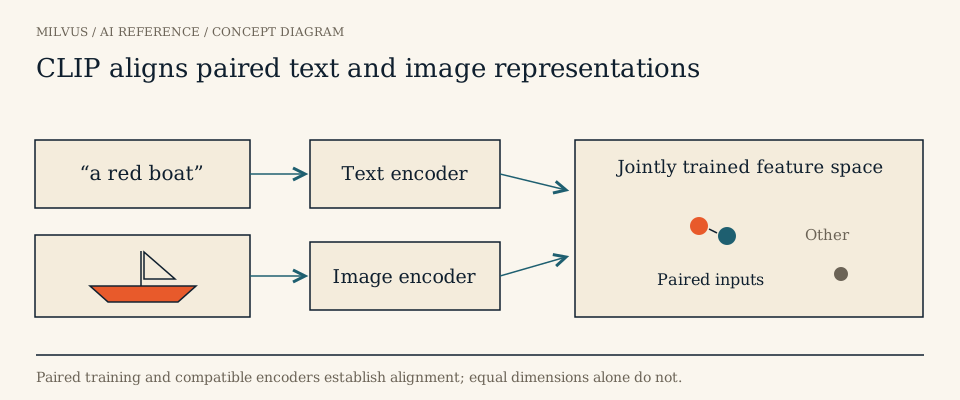 CLIP aligns paired text and image representations
How do multimodal embedding models work?
All of them learn a shared vector space where a caption and its image, or a description and its video clip, land close together. They differ in how they get there.
Dual encoders (CLIP, SigLIP). A text encoder and an image encoder are trained together on large sets of image–caption pairs, so matching pairs score high and non-matching pairs score low. CLIP (Radford et al., 2021) used a contrastive softmax loss over roughly 400 million pairs; SigLIP replaced it with a pairwise sigmoid loss, and SigLIP 2 added multilingual training and better localization. Because each side is encoded independently, images can be embedded once offline and queries embedded in milliseconds, which makes these models cheap to run at scale. They work best on photos and short captions and are weaker on dense text in images, long instructions, and video.
Vision-language-model embedders (VLM2Vec, GME, Qwen3-VL-Embedding, and similar). These start from a multimodal LLM that can read interleaved text and images, then train it to output an embedding. They accept instructions (“find the product shown in this photo”), screenshots with text, multiple images, and in many cases video frames. They are larger and slower than dual encoders but usually much better on document-like images and compositional queries.
Omni-modal embedders. Some recent models extend the same idea to audio and video in one space. Coverage varies widely: a model can be strong at text-to-image and weak at audio-to-video, so treat each direction as a separate claim to verify.
Late-interaction page encoders. ColPali-style models output one vector per image patch and score with MaxSim. They are covered separately in how page encoders use Milvus embedding lists.
Which family fits which workload?
| Workload | Retrieval object | Good starting family |
|---|---|---|
| Photo search, product images, near-duplicate images | Image | Dual encoder (CLIP/SigLIP line) |
| Screenshots, slides, scanned pages with text | Page or image | VLM-based embedder or a late-interaction page encoder |
| Text-to-video search, video curation | Clip or keyframe | VLM-based embedder that accepts video, or a dual encoder over sampled frames |
| Spoken content, sound events | Audio segment | Omni-modal model that documents audio input |
| Mixed e-commerce queries (photo + “but in red”) | Product | Instruction-aware VLM-based embedder |
Start from the row, then use the MMEB leaderboard for the matching category to see which current checkpoints are competitive. Leaderboard positions change too often to freeze here.
Model families to evaluate
These families are well documented. The table describes capabilities, not a ranking; check each model card for the current checkpoint, required processor, and license.
| Model | Inputs | Notes | Route into Milvus |
|---|---|---|---|
| google/siglip2-base-patch16-224 | Image / text | Efficient dual encoder; use its own preprocessing; do not assume video or audio support | Encode externally, insert dense vectors |
| Qwen/Qwen3-VL-Embedding-8B | Text / image / video | Shared space for visual and text inputs; keep page and frame IDs | Native processor, then dense vectors |
| Alibaba-NLP/gme-Qwen2-VL-7B-Instruct | Text / image | Instruction-conditioned; match checkpoint and processor | Encode externally |
| tencent/WeMM-Embedding (2B / 4B / 9B) | Text / image / video / visual document | From the WeChat Vision team; audio is not supported in the checked release. Sizes have different full dimensions and their own Matryoshka truncation options, so never mix sizes even at the same truncated length | Native processor, then dense vectors; no dedicated Milvus Model wrapper |
| OpenSearch-AI/Ops-MM-embedding-v1-7B | Text / image | From Alibaba Cloud’s OpenSearch-AI team; unrelated to native support in any search engine | Encode externally |
| nvidia/omni-embed-nemotron-3b | Text / image / audio / video | Omni-modal research model; check terms and test each modality | Encode externally |
| Haon-Chen/e5-omni-7B | Text / image / audio / video | Compare the cross-modal directions you need, not a global mean | Encode externally |
| jinaai/jina-embeddings-v5-omni-small | Text / image / audio / video | Aligned with its documented text counterpart; a text wrapper does not validate media inputs | Native or hosted API |
Hosted options such as Gemini and Cohere embeddings also accept images (and, for Gemini, more modalities); they are covered in the embedding model catalog. VLM2Vec and VLM2Vec-V2 are model and training recipes released with MMEB, not names for the benchmark itself, and some leaderboard rows have no public weights. Keep that in mind rather than inventing an installation path.
Use each model’s own encoding path
Text-oriented wrappers, including PyMilvus Model, are built for strings. WeMM, for example, publishes Sentence Transformers, Transformers, and serving examples, but that does not mean a text wrapper will accept its image or video payloads. Use the checkpoint’s own processor to produce vectors, verify the dimension, and insert them into Milvus. Record the resolution, frame sampling rate, and prompt format used, because changing any of them changes the vectors.
Design the collection for source reconstruction
A search result is only useful if you can show the user or agent the original evidence. Decide what one row represents before choosing the model, and keep it consistent between ingestion and querying:
- Images: object ID, URI, and optionally a region or crop box.
- Video: clip ID, start and end timestamps, and the frame-sampling settings. Embedding one vector per short clip or keyframe usually works better than one vector per full video.
- Audio: segment boundaries and the model’s audio preprocessing (sample rate, window length).
- Pages: document ID, page number, and rendered image location.
Store these as scalar fields next to a FLOAT_VECTOR field, keep access permissions as filterable metadata, and return the location fields in output_fields. If you index several modalities from different models, use separate vector fields or collections, since their spaces are not compatible. Multi-vector page encodings go in a StructArray embedding list instead.
Evaluate the direction you will ship
Text-to-image, image-to-image, text-to-video, and audio queries behave differently, and recent benchmark work found strong asymmetries between directions in current models. Build a test set for each direction you will actually serve, hold preprocessing constant across candidates, and include visually similar but semantically different items (the same product in different colours, nearly identical driving scenes with different hazards). A close embedding marks a useful candidate; it does not prove two scenes or trajectories are equivalent. Measure relevant-item recall alongside encoding cost per image or per minute of video, and vector storage.
Related reading
- What are multimodal embeddings?
- How do MMEB versions evaluate multimodal embeddings?
- How should you curate image and video data with vector retrieval?
- How can hybrid and multimodal search improve product discovery?
Ready to build? The multimodal RAG tutorial walks through an image-and-text pipeline, and the embedding-list search guide covers multi-vector documents.
Sources and further reading
- CLIP: Learning Transferable Visual Models From Natural Language Supervision (arXiv)
- SigLIP 2: Multilingual Vision-Language Encoders (arXiv)
- VLM2Vec / MMEB (arXiv)
- VLM2Vec/MMEB model and evaluation code
- WeMM technical report
- WeChat Vision team implementation
- Official model card: tencent/WeMM-Embedding-2B
- Official model card: tencent/WeMM-Embedding-4B
- Official model card: tencent/WeMM-Embedding-9B
- Official model card: Qwen/Qwen3-VL-Embedding-8B
- Official model card: Alibaba-NLP/gme-Qwen2-VL-7B-Instruct
- Official model card: OpenSearch-AI/Ops-MM-embedding-v1-7B
- Official model card: google/siglip2-base-patch16-224
- Official model card: nvidia/omni-embed-nemotron-3b
- Official model card: Haon-Chen/e5-omni-7B
- Official model card: jinaai/jina-embeddings-v5-omni-small
- Milvus: StructArray and EmbeddingList search