ColPali, ColQwen, and similar page encoders retrieve documents by looking at each page as an image instead of extracting its text first. A vision-language model turns every page into a grid of patch embeddings, often around a thousand small vectors per page, and a query is scored against them with late interaction (MaxSim). In Milvus, each page’s patch vectors are stored together as an embedding list in a StructArray vector subfield and searched with a MAX_SIM metric.
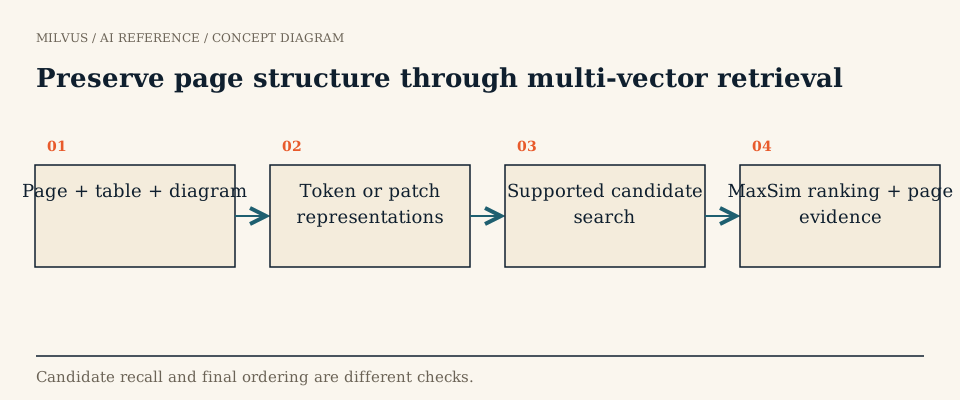 Preserve page structure through multi-vector retrieval
Why skip OCR for document retrieval?
The traditional pipeline for PDFs is OCR or text extraction, layout detection, chunking, then text embedding. Each step loses something: table structure collapses into a run of numbers, charts and diagrams disappear, multi-column layouts get interleaved, and scanned or handwritten pages produce noisy text. The pipeline is also slow and has many moving parts to maintain.
The ColPali paper (Faysse et al., ICLR 2025) showed that embedding page screenshots directly with a vision-language model, then matching with ColBERT-style late interaction, beat strong OCR-based pipelines on its visual document retrieval benchmark, ViDoRe, while being simpler and faster to index. The model sees the page the way a reader does, so a question about “the revenue bar for 2023” can match the chart that contains it, even if no extracted sentence says so.
How does ColPali work?
- Encode the page. The page image is resized and cut into patches. A vision encoder plus a language model produces one contextualized vector per patch; ColPali projects each to 128 dimensions. With its standard input resolution that is roughly a thousand vectors per page.
- Encode the query. The text query is tokenized and each token gets its own 128-dimensional vector in the same space.
- Score with MaxSim. For every query token, find the most similar patch on the page, then add those best matches up. The page score rewards pages where every part of the question finds a strong local match.
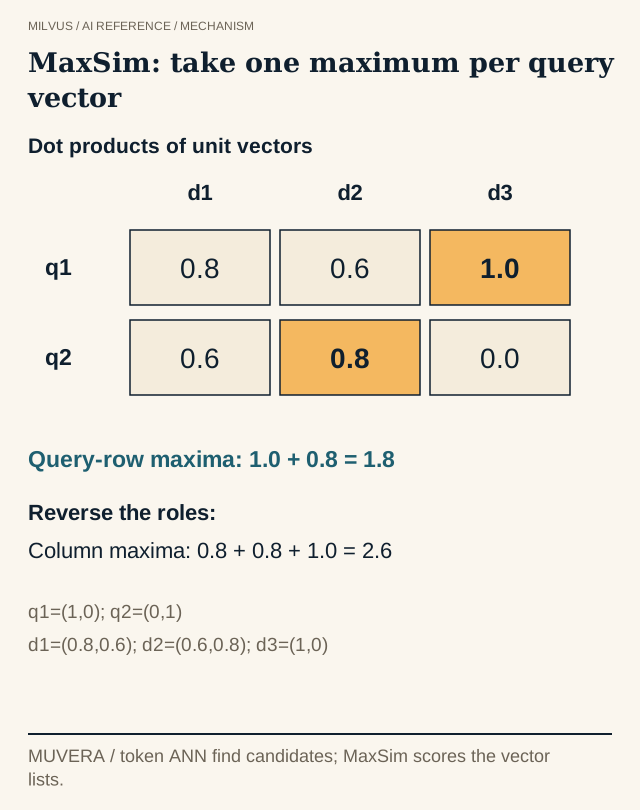 MaxSim selects the best match per query vector, then sums
This is the same late-interaction idea introduced by ColBERT for text passages. Document vectors are computed once at indexing time; only the short query is encoded at search time. For a deeper explanation, see what late-interaction retrieval is.
Which page encoders exist, and how do they differ?
The “Col*” naming means "a ColBERT-style head on top of a vision-language backbone". The families differ mainly in backbone, size, and input handling:
| Family | Backbone idea | When to consider it |
|---|---|---|
| ColPali | PaliGemma vision-language model with a SigLIP image encoder | The reference design; widely supported in tooling, including a native Transformers implementation |
| ColQwen (for example ColQwen2.5) | Qwen2.5-VL backbone, which accepts images at varying resolutions | Pages with fine print or unusual aspect ratios, and multilingual documents |
| ColSmol | A much smaller vision-language backbone | CPU or low-memory deployments, quick prototypes, and large backfills where encoding cost dominates |
| Nemotron ColEmbed | NVIDIA’s late-interaction visual-document encoder | Another strong candidate; check its model terms, since some checkpoints are non-commercial |
Check the exact checkpoint’s loading path before building a pipeline. Some checkpoints use a native Transformers class (for example ColPaliForRetrieval with ColPaliProcessor), while others require the colpali-engine package, and the two formats are not interchangeable. For current quality comparisons, use the visual-document columns of the MMEB leaderboard or the ViDoRe results rather than a fixed ranking.
What does multi-vector storage cost?
Multi-vector retrieval trades storage for accuracy, and the numbers are worth working out before you index a large archive. At about 1,000 vectors × 128 dimensions × 4 bytes (float32), one page takes roughly 0.5 MB of raw vector data. A million pages is therefore around 500 GB before indexing overhead, compared with a few gigabytes for one 1,024-dimensional float32 vector per page.
Common ways to bring that down:
- Lower precision. Store
FLOAT16_VECTORorBFLOAT16_VECTORsubfields to halve the footprint, or use a quantized index variant such asHNSW_SQorHNSW_PQ. - Fewer vectors per page. Pooling neighbouring patches or dropping near-blank patches reduces list length; validate the recall impact on your own pages.
- A compressed candidate stage. Use a fixed-size encoding of each list for candidate retrieval and run exact MaxSim only on the shortlist (see the search strategies below).
How do you store page embeddings in Milvus?
Milvus 3.0 represents an embedding list as a StructArray field: an array of Struct elements, where a vector subfield holds one patch vector per element. A page becomes one row, with page-level metadata as ordinary scalar fields.
from pymilvus import MilvusClient, DataType

client = MilvusClient(uri="http://localhost:19530")
schema = client.create_schema()
schema.add_field("page_id", DataType.INT64, is_primary=True)
schema.add_field("doc_id", DataType.VARCHAR, max_length=128)
schema.add_field("page_number", DataType.INT32)
schema.add_field("image_uri", DataType.VARCHAR, max_length=1024)

patch = client.create_struct_field_schema()
patch.add_field(field_name="emb_list_vector", datatype=DataType.FLOAT_VECTOR, dim=128)
schema.add_field(
    field_name="patches",
    datatype=DataType.ARRAY,
    element_type=DataType.STRUCT,
    struct_schema=patch,
    max_capacity=1100,  # at least the longest list your encoder emits
)

index_params = client.prepare_index_params()
index_params.add_index(
    field_name="patches[emb_list_vector]",
    index_type="HNSW",
    metric_type="MAX_SIM_COSINE",
    params={"M": 16, "efConstruction": 200},
)
At query time, wrap the query token vectors in an EmbeddingList and search the subfield:
from pymilvus.client.embedding_list import EmbeddingList

query = EmbeddingList()
for vec in query_token_vectors:  # one 128-d vector per query token
    query.add(vec)

results = client.search(
    collection_name="pages",
    data=[query],
    anns_field="patches[emb_list_vector]",
    limit=10,
    output_fields=["doc_id", "page_number", "image_uri"],
)
Embedding-list indexes support MAX_SIM, MAX_SIM_COSINE, MAX_SIM_IP, and MAX_SIM_L2 with index types including HNSW, its SQ/PQ/PRQ variants, IVF_FLAT, and DISKANN. A vector subfield accepts only one index, and sparse vectors are not supported inside a StructArray. This is a different design from storing separate title and body vectors and fusing them with hybrid search: MaxSim scores the whole list as one document.
Which embedding-list search strategy should you use?
Milvus offers three ways to retrieve candidates before the final MaxSim scoring:
- TokenANN (the default) indexes every patch vector, searches with each query vector, and aggregates hits back to pages. It is the quality-first choice for short to medium lists, but the index is large.
- MUVERA compresses each list into one fixed-dimensional vector with random projections, so candidate retrieval becomes ordinary single-vector search. No training is needed; tune
muvera_num_projectionsandmuvera_num_repeats. - LEMUR trains a small model to compress each list. It is aimed at long lists and visual or multimodal documents where token-level vectors are less discriminative, at the cost of a training step.
The search parameter retrieval_ann_ratio widens the first-round candidate pool, and emb_list_rerank (on by default) rescores candidates with exact MaxSim. Note that DISKANN supports only TokenANN for embedding lists. Measure candidate recall and final ranking separately: exact rescoring cannot rescue a page that never entered the candidate set.
Designing a reliable visual-document pipeline
Store everything needed to show the evidence: document ID, page number, rendered image location, document version, and permission fields for filtering. Keep the rendering settings (DPI, resolution, page size limits) fixed, because changing them changes the vectors. Evaluate on the pages that break text pipelines, such as tables, multi-column layouts, charts, scanned forms, and near-duplicate versions of the same contract, and check that the returned page actually contains the answer. Do not average patch vectors into one page vector without validating it; that throws away the local matching that makes these models work.
Visual retrieval also combines well with text: a BM25 or dense text field on extracted text can catch exact identifiers, while the page encoder catches layout and visual evidence. A multimodal reranker can then reorder the final shortlist.
Related reading
- What is multi-vector retrieval, and how do MaxSim and MUVERA work?
- Which multimodal embedding families fit image, video, and audio retrieval?
- How should you design vector retrieval for legal-document agents?
- How should you design evidence retrieval for healthcare agents?
To build it, start from the StructArray and EmbeddingList search guide, then wire pages into an application with the multimodal RAG tutorial.
Sources and further reading
- ColPali: Efficient Document Retrieval with Vision Language Models (arXiv)
- ColBERT: late interaction over BERT (arXiv)
- ColPali in Hugging Face Transformers
- Official model card: vidore/colpali-v1.3-hf
- Official model card: vidore/colqwen2.5-v0.2
- Official model card: vidore/colSmol-500M
- Official model card: nvidia/nemotron-colembed-vl-8b-v2
- Milvus: EmbeddingList search and StructArray
- Milvus: create a StructArray field
- Milvus: index StructArray fields
- Milvus: EmbeddingList search strategies