

NGRAM
The NGRAM index in Milvus accelerates LIKE queries and eligible regex filters on VARCHAR fields or specific JSON paths within JSON fields. Before building the index, Milvus splits text into short, overlapping substrings of a fixed length n, known as n-grams. For example, with n = 3, the word “Milvus” is split into 3-grams: “Mil”, “ilv”, “lvu”, and “vus”. These n-grams are then stored in an inverted index that maps each gram to the document IDs in which it appears. At query time, this index allows Milvus to quickly narrow the search to a small set of candidates before verifying the original filter condition.
Use it when you need fast prefix, suffix, infix, wildcard, or eligible regex filtering such as:
name LIKE "data%"title LIKE "%vector%"path LIKE "%json"message =~ "error.*timeout"url =~ "/api/v[0-9]+/users"
For details on LIKE and regex filter expression syntax, refer to Pattern Matching.
How it works
Milvus implements the NGRAM index in a two-phase process:
Build index: Generate n-grams for each document and build an inverted index during ingest.
Accelerate queries : Use the index to filter to a small candidate set, then verify exact matches.
Phase 1: Build the index
During data ingestion, Milvus builds the NGRAM index by performing two main steps:
Decompose text into n-grams: Milvus slides a window of n across each string in the target field and extracts overlapping substrings, or n-grams. The length of these substrings falls within a configurable range,
[min_gram, max_gram].min_gram: The shortest n-gram to generate. This also defines the minimum query substring length that can benefit from the index.max_gram: The longest n-gram to generate. At query time, it is also used as the maximum window size when splitting long query strings.
For example, with
min_gram=2andmax_gram=3, the string"AI database"is broken down as follows: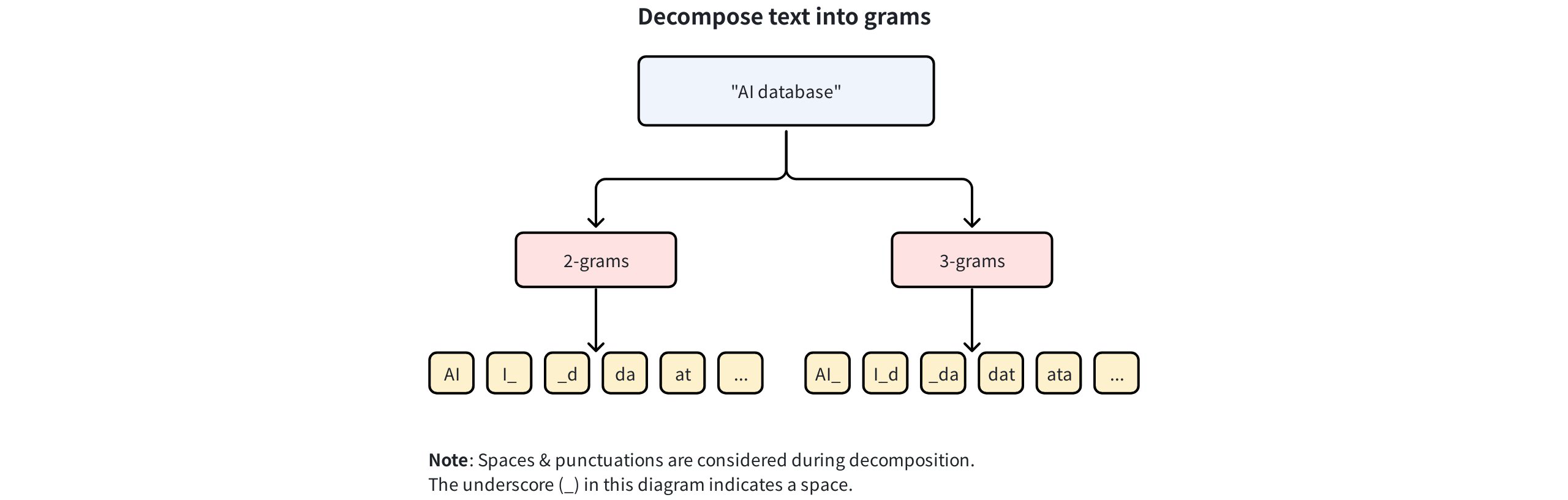 Build Ngram Index
2-grams:
AI,I_,_d,da,at, …3-grams:
AI_,I_d,_da,dat,ata, …
For a range
[min_gram, max_gram], Milvus generates all n-grams for every length between the two values (inclusive). For example, with[2,4]and the word"text", Milvus generates:2-grams:
te,ex,xt3-grams:
tex,ext4-grams:
textN-gram decomposition is character-based and language-agnostic. For example, in Chinese,
"向量数据库"withmin_gram = 2is decomposed into:"向量","量数","数据","据库".Spaces and punctuation are treated as characters during decomposition.
Decomposition preserves original case, and matching is case-sensitive. For example,
"Database"and"database"will generate different n-grams and require exact case matching during queries.
Build an inverted index: An inverted index is created that maps each generated n-gram to a list of the document IDs containing it.
For instance, if the 2-gram
"AI"appears in documents with IDs 1, 5, 6, 8, and 9, the index records{"AI": [1, 5, 6, 8, 9]}. This index is then used at query time to quickly narrow the search scope.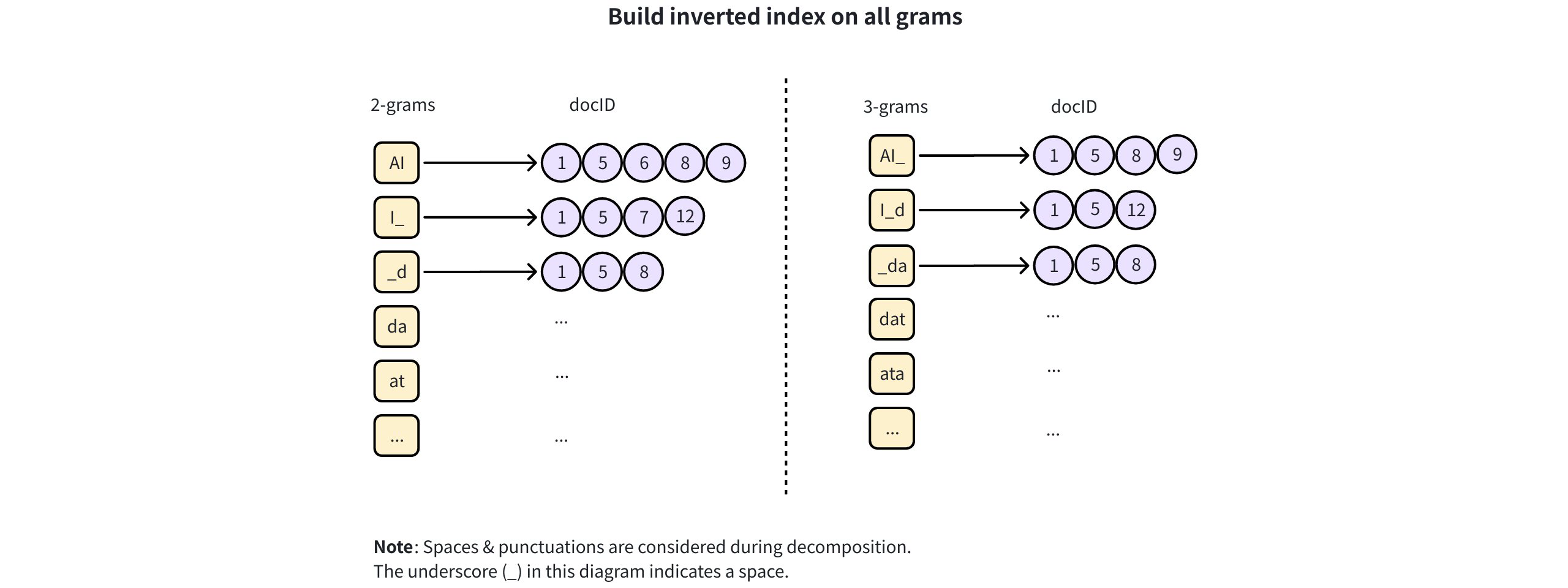 Build Ngram Index 2
A wider
[min_gram, max_gram]range creates more grams and larger mapping lists. If memory is tight, consider mmap mode for very large posting lists. For details, refer to Use mmap.
Phase 2: Accelerate queries
When a LIKE filter or an eligible regex filter is executed, Milvus uses the NGRAM index to accelerate the query in the following steps:
 Accelerate Queries
Extract the query term: The contiguous substring without wildcards is extracted from the
LIKEexpression (e.g.,"%database%"becomes"database"). For regex filters, Milvus extracts fixed literal substrings from the regex pattern when possible. For example,message =~ "error.*timeout"contains the literalserrorandtimeout.Decompose the query term: The query term is decomposed into n-grams based on its length (
L) and themin_gramandmax_gramsettings.If
L < min_gram, the index cannot be used, and the query falls back to a full scan.If
min_gram ≤ L ≤ max_gram, the entire query term is treated as a single n-gram, and no further decomposition is necessary.If
L > max_gram, the query term is broken down into overlapping grams using a window size equal tomax_gram.
For example, if the
max_gramis set to3and the query term is"database", which has a length of 8, it is decomposed into 3-gram substrings like"dat","ata","tab", and so on.Look for each gram & intersect: Milvus looks up each of the query grams in the inverted index and then intersects the resulting document ID lists to find a small set of candidate documents. These candidates contain all the grams from the query.
Verify and return results: The original
LIKEor regex filter is then applied as a final check on only the small candidate set to find the exact matches.
Create an NGRAM index
You can create an NGRAM index on a VARCHAR field or on a specific path inside a JSON field.
Example 1: Create on a VARCHAR field
For a VARCHAR field, you simply specify the field_name and configure min_gram and max_gram.
from pymilvus import MilvusClient

client = MilvusClient(uri="http://localhost:19530") # Replace with your server address

# Assume you have defined a VARCHAR field named "text" in your collection schema

# Prepare index parameters
index_params = client.prepare_index_params()

# Add NGRAM index on the "text" field
index_params.add_index(
    field_name="text",   # Target VARCHAR field
    index_type="NGRAM",           # Index type is NGRAM
    index_name="ngram_index",     # Custom name for the index
    min_gram=2,                   # Minimum substring length (e.g., 2-gram: "st")
    max_gram=3                    # Maximum substring length (e.g., 3-gram: "sta")
)

# Create the index on the collection
client.create_index(
    collection_name="Documents",
    index_params=index_params
)
import io.milvus.v2.client.ConnectConfig;
import io.milvus.v2.client.MilvusClientV2;
import io.milvus.v2.common.IndexParam;
import io.milvus.v2.service.index.request.CreateIndexReq;
import java.util.Arrays;
import java.util.HashMap;
import java.util.Map;

ConnectConfig connectConfig = ConnectConfig.builder()
        .uri("http://localhost:19530")
        .token("root:Milvus")
        .build();
MilvusClientV2 client = new MilvusClientV2(connectConfig);

Map<String, Object> params = new HashMap<>();
params.put("min_gram", "2");
params.put("max_gram", "3");

client.createIndex(CreateIndexReq.builder()
        .collectionName("Documents")
        .indexParams(Arrays.asList(
                IndexParam.builder().fieldName("text").indexType(IndexParam.IndexType.NGRAM)
                        .indexName("ngram_index")
                        .extraParams(params)
                        .build()))
        .build());
import (
    "context"
    "fmt"

    "github.com/milvus-io/milvus/client/v3/index"
    "github.com/milvus-io/milvus/client/v3/milvusclient"
)

ctx := context.Background()

cli, err := milvusclient.New(ctx, &milvusclient.ClientConfig{
    Address: "http://localhost:19530",
    APIKey:  "root:Milvus",
})
if err != nil {
    fmt.Println(err)
}

_, err = cli.CreateIndex(ctx, milvusclient.NewCreateIndexOption("Documents", "text", index.NewNgramIndex(2, 3)).WithIndexName("ngram_index"))
if err != nil {
    fmt.Println(err)
}
use milvus::v2::prelude::*;
use std::collections::HashMap;

let config = ConnectConfig::new().uri("http://localhost:19530").token("root:Milvus");
let client = ClientV2::new(&config).await?;

let request = CreateIndexRequest::builder()
    .collection_name("Documents")
    .index_params(vec![IndexParam::new()
        .field_name("text")
        .index_name("ngram_index")
        .index_type(IndexType::Ngram)
        .extra_params(HashMap::from([
            ("min_gram".to_string(), "2".to_string()),
            ("max_gram".to_string(), "3".to_string()),
        ]))])
    .build()?;
client.create_index(request).await?;
#include "milvus/MilvusClientV2.h"
#include <iostream>

auto client = milvus::MilvusClientV2::Create();
auto status = client->Connect(milvus::ConnectParam("http://localhost:19530").WithToken("root:Milvus"));
if (!status.IsOk()) {
    std::cout << status.Message() << std::endl;
}

milvus::IndexDesc ngram_index("text", "ngram_index", milvus::IndexType::NGRAM);
ngram_index.AddExtraParam("min_gram", "2");
ngram_index.AddExtraParam("max_gram", "3");

milvus::CreateIndexRequest create_request;
create_request.WithCollectionName("Documents");
create_request.WithIndexes({ngram_index});
create_request.WithSync(true);

status = client->CreateIndex(create_request);
if (!status.IsOk()) {
    std::cout << status.Message() << std::endl;
}
import { MilvusClient } from "@zilliz/milvus2-sdk-node";

const client = new MilvusClient({ address: "http://localhost:19530", token: "root:Milvus" });

await client.createIndex({
    collection_name: "Documents",
    field_name: "text",
    index_name: "ngram_index",
    index_type: "NGRAM",
    params: { min_gram: 2, max_gram: 3 },
});
export CLUSTER_ENDPOINT="http://localhost:19530"
export TOKEN="root:Milvus"

curl --request POST \
--url "${CLUSTER_ENDPOINT}/v2/vectordb/indexes/create" \
--header "Authorization: Bearer ${TOKEN}" \
--header "Content-Type: application/json" \
-d '{
    "collectionName": "Documents",
    "indexParams": [
        {
            "fieldName": "text",
            "indexName": "ngram_index",
            "params": {
                "index_type": "NGRAM",
                "min_gram": 2,
                "max_gram": 3
            }
        }
    ]
}'
This configuration generates 2-grams and 3-grams for each string in text and stores them in the inverted index.
Example 2: Create on a JSON path
For a JSON field, in addition to the gram settings, you must also specify:
params.json_path– the JSON path that points to the value you want to index.params.json_cast_type– must be"varchar"(case-insensitive), because NGRAM indexing operates on strings.
# Assume you have defined a JSON field named "json_field" in your collection schema, with a JSON path named "body"

# Prepare index parameters
index_params = client.prepare_index_params()

# Add NGRAM index on a JSON field
index_params.add_index(
    field_name="json_field",              # Target JSON field
    index_type="NGRAM",                   # Index type is NGRAM
    index_name="json_ngram_index",        # Custom index name
    min_gram=2,                           # Minimum n-gram length
    max_gram=4,                           # Maximum n-gram length
    params={
        "json_path": "json_field[\"body\"]",  # Path to the value inside the JSON field
        "json_cast_type": "varchar"                  # Required: cast the value to varchar
    }
)

# Create the index on the collection
client.create_index(
    collection_name="Documents",
    index_params=index_params
)
import io.milvus.v2.common.IndexParam;
import io.milvus.v2.service.index.request.CreateIndexReq;
import java.util.Arrays;
import java.util.HashMap;
import java.util.Map;

Map<String, Object> params = new HashMap<>();
params.put("min_gram", "2");
params.put("max_gram", "4");
params.put("json_path", "json_field[\"body\"]");
params.put("json_cast_type", "varchar");

client.createIndex(CreateIndexReq.builder()
        .collectionName("Documents")
        .indexParams(Arrays.asList(
                IndexParam.builder().fieldName("json_field").indexType(IndexParam.IndexType.NGRAM)
                        .indexName("json_ngram_index")
                        .extraParams(params)
                        .build()))
        .build());
import (
    "context"
    "fmt"

    "github.com/milvus-io/milvus/client/v3/index"
    "github.com/milvus-io/milvus/client/v3/milvusclient"
)

opt := milvusclient.NewCreateIndexOption("Documents", "json_field", index.NewNgramIndex(2, 4)).
    WithIndexName("json_ngram_index")
opt.WithExtraParam("json_path", `json_field["body"]`)
opt.WithExtraParam("json_cast_type", "varchar")

_, err = cli.CreateIndex(ctx, opt)
if err != nil {
    fmt.Println(err)
}
use milvus::v2::prelude::*;
use std::collections::HashMap;

    let request = CreateIndexRequest::builder()
        .collection_name("Documents")
        .index_params(vec![IndexParam::new()
            .field_name("json_field")
            .index_name("json_ngram_index")
            .index_type(IndexType::Ngram)
            .extra_params(HashMap::from([
                ("min_gram".to_string(), "2".to_string()),
                ("max_gram".to_string(), "4".to_string()),
                ("json_path".to_string(), "json_field[\"body\"]".to_string()),
                ("json_cast_type".to_string(), "varchar".to_string()),
            ]))])
        .build()?;
    client.create_index(request).await?;
milvus::IndexDesc json_ngram_index("json_field", "json_ngram_index", milvus::IndexType::NGRAM);
json_ngram_index.AddExtraParam("min_gram", "2");
json_ngram_index.AddExtraParam("max_gram", "4");
json_ngram_index.AddExtraParam("json_path", "json_field[\"body\"]");
json_ngram_index.AddExtraParam("json_cast_type", "varchar");

milvus::CreateIndexRequest create_request;
create_request.WithCollectionName("Documents");
create_request.WithIndexes({json_ngram_index});
create_request.WithSync(true);

status = client->CreateIndex(create_request);
if (!status.IsOk()) {
    std::cout << status.Message() << std::endl;
}
await client.createIndex({
    collection_name: "Documents",
    field_name: "json_field",
    index_name: "json_ngram_index",
    index_type: "NGRAM",
    params: { min_gram: 2, max_gram: 4, json_path: 'json_field["body"]', json_cast_type: "varchar" },
});
curl --request POST \
--url "${CLUSTER_ENDPOINT}/v2/vectordb/indexes/create" \
--header "Authorization: Bearer ${TOKEN}" \
--header "Content-Type: application/json" \
-d '{
    "collectionName": "Documents",
    "indexParams": [
        {
            "fieldName": "json_field",
            "indexName": "json_ngram_index",
            "params": {
                "index_type": "NGRAM",
                "min_gram": 2,
                "max_gram": 4,
                "json_path": "json_field[\"body\"]",
                "json_cast_type": "varchar"
            }
        }
    ]
}'
In this example:
Only the value at
json_field["body"]is indexed.The value is cast to
VARCHARbefore n-gram tokenization.Milvus generates substrings of length 2 to 4 and stores them in the inverted index.
For more information on how to index a JSON field, refer to JSON Indexing.
Queries accelerated by NGRAM
For the NGRAM index to be applied:
The query must target a
VARCHARfield (or JSON path) that has anNGRAMindex.The literal part of the
LIKEpattern must be at leastmin_gramcharacters long.(For example, if your shortest expected query term is 2 characters, set min_gram=2 when creating the index.)
Supported query types:
Prefix match
# Match any string that starts with the substring "database"
filter = 'text LIKE "database%"'
// Match any string that starts with the substring "database" String filter = "text LIKE \"database%\"";// Match any string that starts with the substring "database" filter := "text LIKE \"database%\""// Match any string that starts with the substring "database" let filter = "text LIKE \"database%\"";// Match any string that starts with the substring "database" const auto filter = R"(text LIKE "database%")";// Match any string that starts with the substring "database" const filter = 'text LIKE "database%"';# Match any string that starts with the substring "database" # Use this filter expression in the "filter" field of the query/search request: # "filter": "text LIKE \"database%\""Suffix match
# Match any string that ends with the substring "database"
filter = 'text LIKE "%database"'
// Match any string that ends with the substring "database" String filter = "text LIKE \"%database\"";// Match any string that ends with the substring "database" filter := "text LIKE \"%database\""// Match any string that ends with the substring "database" let filter = "text LIKE \"%database\"";// Match any string that ends with the substring "database" const auto filter = R"(text LIKE "%database")";// Match any string that ends with the substring "database" const filter = 'text LIKE "%database"';# Match any string that ends with the substring "database" # Use this filter expression in the "filter" field of the query/search request: # "filter": "text LIKE \"%database\""Infix match
# Match any string that contains the substring "database" anywhere
filter = 'text LIKE "%database%"'
// Match any string that contains the substring "database" anywhere String filter = "text LIKE \"%database%\"";// Match any string that contains the substring "database" anywhere filter := "text LIKE \"%database%\""// Match any string that contains the substring "database" anywhere let filter = "text LIKE \"%database%\"";// Match any string that contains the substring "database" anywhere const auto filter = R"(text LIKE "%database%")";// Match any string that contains the substring "database" anywhere const filter = 'text LIKE "%database%"';# Match any string that contains the substring "database" anywhere # Use this filter expression in the "filter" field of the query/search request: # "filter": "text LIKE \"%database%\""Wildcard match
Milvus supports both
%(zero or more characters) and_(exactly one character).# Match any string where "st" appears first, and "um" appears later in the text filter = 'text LIKE "%st%um%"'// Match any string where "st" appears first, and "um" appears later in the text String filter = "text LIKE \"%st%um%\"";// Match any string where "st" appears first, and "um" appears later in the text filter := "text LIKE \"%st%um%\""// Match any string where "st" appears first, and "um" appears later in the text let filter = "text LIKE \"%st%um%\"";// Match any string where "st" appears first, and "um" appears later in the text const auto filter = R"(text LIKE "%st%um%")";// Match any string where "st" appears first, and "um" appears later in the text const filter = 'text LIKE "%st%um%"';# Match any string where "st" appears first, and "um" appears later in the text # Use this filter expression in the "filter" field of the query/search request: # "filter": "text LIKE \"%st%um%\""JSON path queries
filter = 'json_field["body"] LIKE "%database%"'String filter = "json_field[\"body\"] LIKE \"%database%\"";filter := "json_field[\"body\"] LIKE \"%database%\""let filter = "json_field[\"body\"] LIKE \"%database%\"";const auto filter = R"(json_field["body"] LIKE "%database%")";const filter = 'json_field["body"] LIKE "%database%"';# Use this filter expression in the "filter" field of the query/search request: # "filter": "json_field[\"body\"] LIKE \"%database%\""Regex filter
# Match log messages that contain "error" followed later by "timeout"
filter = 'text =~ "error.*timeout"'
// Match log messages that contain "error" followed later by "timeout" String filter = "text =~ \"error.*timeout\"";// Match log messages that contain "error" followed later by "timeout" filter := "text =~ \"error.*timeout\""// Match log messages that contain "error" followed later by "timeout" let filter = "text =~ \"error.*timeout\"";// Match log messages that contain "error" followed later by "timeout" const auto filter = R"(text =~ "error.*timeout")";// Match log messages that contain "error" followed later by "timeout" const filter = 'text =~ "error.*timeout"';# Match log messages that contain "error" followed later by "timeout" # Use this filter expression in the "filter" field of the query/search request: # "filter": "text =~ \"error.*timeout\""Regex filter on a JSON path
filter = 'json_field["body"] =~ "error.*timeout"'String filter = "json_field[\"body\"] =~ \"error.*timeout\"";filter := "json_field[\"body\"] =~ \"error.*timeout\""let filter = "json_field[\"body\"] =~ \"error.*timeout\"";const auto filter = R"(json_field["body"] =~ "error.*timeout")";const filter = 'json_field["body"] =~ "error.*timeout"';# Use this filter expression in the "filter" field of the query/search request: # "filter": "json_field[\"body\"] =~ \"error.*timeout\""
For more information on filter expression syntax, refer to Pattern Matching.
Drop an index
Use the drop_index() method to remove an existing index from a collection.
In v2.6.3 or earlier, you must release the collection before dropping a scalar index.
From v2.6.4 or later, you can drop a scalar index directly once it’s no longer needed—no need to release the collection first.
client.drop_index(
    collection_name="Documents",   # Name of the collection
    index_name="ngram_index" # Name of the index to drop
)
import io.milvus.v2.service.index.request.DropIndexReq;

client.dropIndex(DropIndexReq.builder()
        .collectionName("Documents")
        .indexName("ngram_index")
        .build());
import (
    "fmt"

    "github.com/milvus-io/milvus/client/v3/milvusclient"
)

err = cli.DropIndex(ctx, milvusclient.NewDropIndexOption("Documents", "ngram_index"))
if err != nil {
    fmt.Println(err)
}
use milvus::v2::prelude::*;

    let request = DropIndexRequest::builder()
        .collection_name("Documents")
        .index_name("ngram_index")
        .build()?;
    client.drop_index(request).await?;
status = client->DropIndex(milvus::DropIndexRequest()
                               .WithCollectionName("Documents")
                               .WithIndexName("ngram_index"));
if (!status.IsOk()) {
    std::cout << status.Message() << std::endl;
}
await client.dropIndex({ collection_name: "Documents", index_name: "ngram_index" });
curl --request POST \
--url "${CLUSTER_ENDPOINT}/v2/vectordb/indexes/drop" \
--header "Authorization: Bearer ${TOKEN}" \
--header "Content-Type: application/json" \
-d '{
    "collectionName": "Documents",
    "indexName": "ngram_index"
}'
Usage notes
Field types: Supported on
VARCHARandJSONfields. For JSON, provide bothparams.json_pathandparams.json_cast_type="varchar".Regex acceleration:
NGRAMaccelerates regex filters only when Milvus can extract fixed literal substrings from the regex pattern. Patterns such as[a-z]+may fall back to scanning because they do not contain fixed literals.Case-insensitive regex: Regex patterns with
(?i)are supported, but they may skipNGRAMoptimization because the index preserves original case.Verification step: For regex filters,
NGRAMproduces candidates and Milvus verifies them with the full RE2 regex pattern, so index acceleration does not change match results.Unicode: NGRAM decomposition is character-based and language-agnostic and includes whitespace and punctuation.
Space–time trade-off: Wider gram ranges
[min_gram, max_gram]produce more grams and larger indexes. If memory is tight, considermmapmode for large posting lists. For more information, refer to Use mmap.Immutability:
min_gramandmax_gramcannot be changed in place—rebuild the index to adjust them.
Best practices
Choose
min_gramandmax_gramto match search behaviorStart with
min_gram=2,max_gram=3.Set
min_gramto the shortest literal you expect users to type.Set
max_gramnear the typical length of meaningful substrings; largermax_gramimproves filtering but increases space.
Avoid low-selectivity grams
Highly repetitive patterns (e.g.,
"aaaaaa") provide weak filtering and may yield limited gains.Normalize consistently
Apply the same normalization to ingested text and query literals (e.g., lowercasing, trimming) if your use case needs it.